Appearance -> Transform -> Scale & rotate. Why does it appear below not on top? How to change it?
- September 21, 2023
- 3 replies
- 442 views
Hello, I have been following an Illustrator tutorial on Youtube (by LearnIt) and I've been trying to follow each exercise to get comfortable with the software. I also want to understand it well.
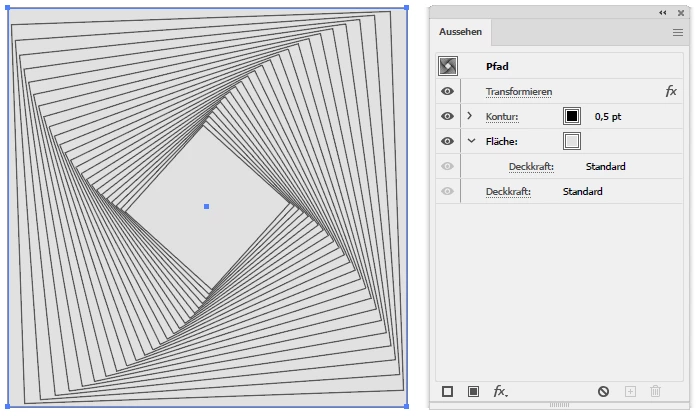
So there is this exercise in which I follow the steps, but get a different effect than the teacher.
I'm attaching screenshots to my post.
(His shape is orange, mine is blue.)
So we are using the Appearance panel, from where we choose fx and then transform. We decrease the size of the rectangle by 95% as well as rotate it by 2%, and make multiple copies.
The effect the teacher is getting varies from mine. Could somebody analyze why? I concluded that my copies appear below the original shape while his appear on top. Let me know how I can change it and why his default settings are different.
Thank you very much in advance.
 AdChoices