Participant
July 9, 2026
Answered

Apply gradient to stroke—no gradient in arrowhead

  • July 9, 2026
  • 3 replies
  • 65 views

I have a line with an arrowhead. I would like it to have a smooth gradient along the stroke and through the end of the arrowhead. When I apply the gradient to the stroke, the gradient does not persist through the arrowhead (see attached photos). 

I could make this work by expanding the appearance of the shape etc., but I’d rather have a more elegant/editable solution. Any suggestions?
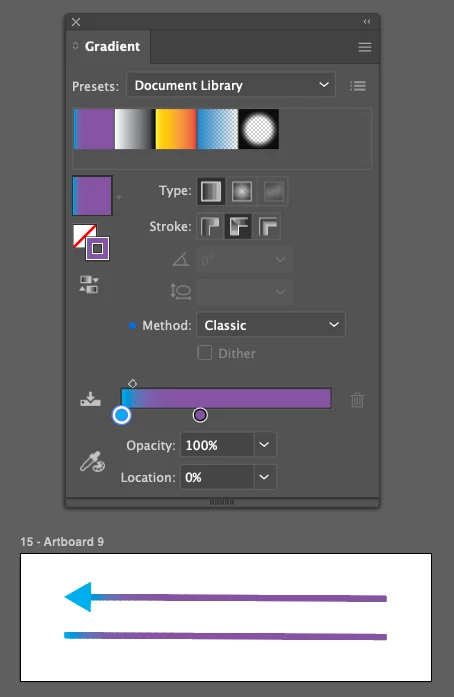
Bottom: Arrow with discontinuous gradient compared to a line with the same gradient applied (detail in image 2). Top: Gradient settings
Detail from image 1


    Correct answer Monika Gause

    Two options: You can use an artbrush and a knockout group (it would even be possible to have the arrow tip not bent): https://youtu.be/3YEJSseXUwQ
    and you can use an opacity mask https://youtu.be/YFWQAcK-pIA

    3 replies

    reedyAuthor
    Participant
    July 9, 2026

    Yes ​@Monika Gause the trouble does come from bent lines, I need gradient along stroke—see below. I guess I could use two separate lines and do my best to match the color at the joint…

    It did work to expand the arrow into a 2D shape and then use a freeform gradient as the fill, but it was messy and will be difficult to edit later…

    Thanks for the advice!!


    Monika Gause
    Community Expert
    Monika GauseCommunity ExpertCorrect answer
    Community Expert
    July 9, 2026

    Two options: You can use an artbrush and a knockout group (it would even be possible to have the arrow tip not bent): https://youtu.be/3YEJSseXUwQ
    and you can use an opacity mask https://youtu.be/YFWQAcK-pIA

    reedyAuthor
    Participant
    July 9, 2026

    Thank you! The opacity mask is perfect!

    Ton Frederiks
    Community Expert
    Community Expert
    July 9, 2026

    @reedy  If you select the first option Apply gradient within stroke instead of along, it is smooth. 

    Monika Gause
    Community Expert
    Community Expert
    July 9, 2026

    It will only work with the “normal” gradient inside the stroke. I assume this is not only about straight lines, right? Expanding the stroke will not work either, because there is no longer a stroke