
Apply Offset Path with specific values via script
I am trying to make an action that has many steps. One of the steps is a Menu Item which is Effect > Path > Path Offset. When I execute the the action, Path Offset window pops up and wait for me to enter values (Offset, Joins). I enter Offset: 0.1 mm, Joins: Round then I click Ok for the action to continue. I am looking for a way to set these values automatically so the action continues without me entering the same values every time.
I think this has two routes to solve. I should either add a script to implement a series of keystrokes right after the Path Offset menu item, in my case the key strokes in order should be "0.1 mm > tab > downarrow > enter". These key strokes will set Offset: 0.1 mm, Joins: Round and then click Ok.
Or, I should implement the Path Offset command with the desired values via calling Path Offset function in a script.
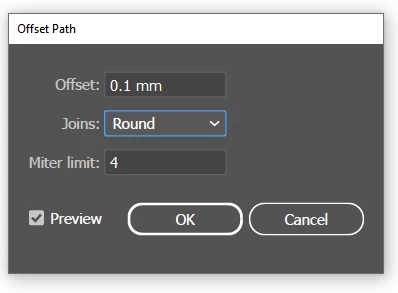
Would you please help me with this. Is this something doable? Thank you in advance.


 AdChoices