

Apply Pathfinder's boolean operations to multiple objects from a mask
Hi, I work on large-format vector drawings that use traced and hand-drawn elements.
I would like to apply boolean operations aka Pathfinder operations such as Add, Subtract and Intersection to masses of traced vector objects in Illustrator. I don't mind if these objects need to be grouped first. But the numbers of objects involved means the operation needs to be automated.
My aim is to trim large numbers of traced objects to the outlines of masking objects drawn by me not the tracing algorithm.
Inkscape allows this to a limited exent with a script. The script throws errors and fails on large numbers of paths, unfortunately. It also layers tracings differently from either Trace Abutting or Trace Overlapping options in Illustrator.
I have learned Illustrator's highly unintuitive commands
Object > Expand (I think this means convert trace to paths)
and
Window > Pathfinder (I think this means boolean operations)
as well as the unclear distinction between
Open
and
Place
to put a bitmap on an Artboard.
I have then tried:
1
Image Trace
Expand
Draw the mask with Pen Tool
Object > Paths > Divide Objects Below
This only selects objects below my mask and frees them from the expanded group, rather than cut them to the path of the mask.
2
Image Trace
Expand
Draw the mask with Pen tool
Group the objects in the expanded/converted tracing
Window > Pathfinder > Intersection
This only returns an error about selecting two paths. I want the path of my mask to cut everything it touches and then leave me, in this case, with the intersection of the results.
Any help would be greatly appreciated.
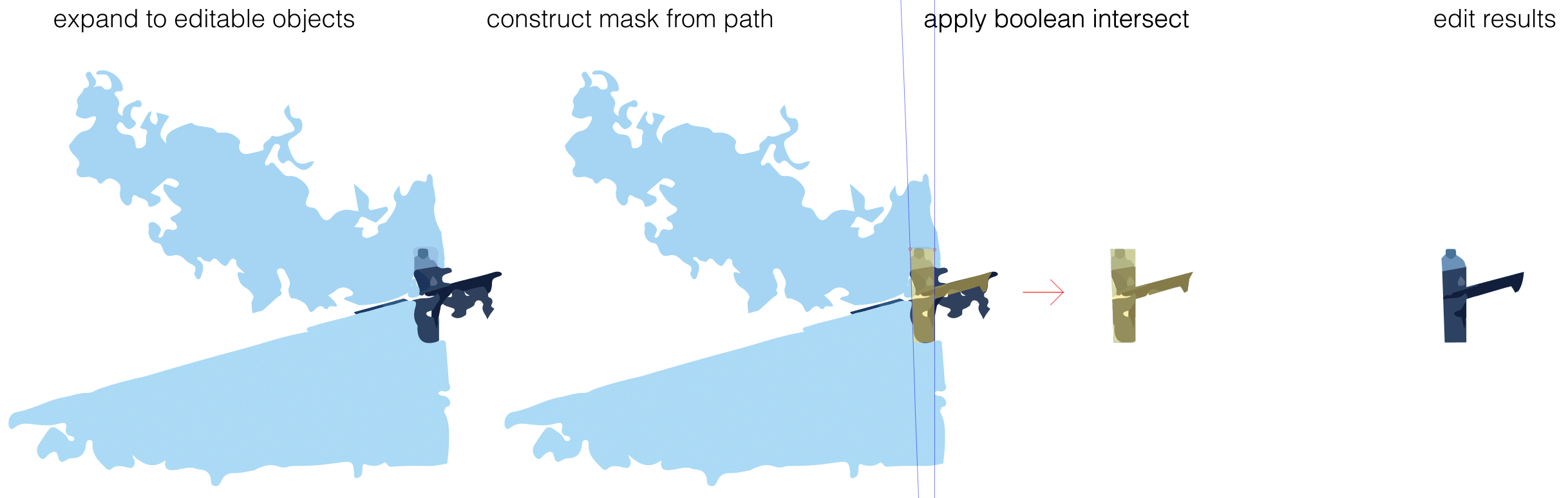
Below is my preferred workflow visualised. I am usually working with expanded traces with hundreds or thousands of objects.
 AdChoices