
Participant
May 14, 2024
Question

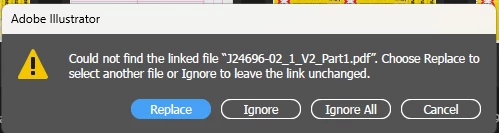
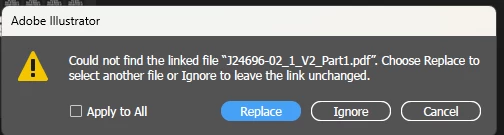
"Apply to All" Button Missing from Illustrator (28.5)

  • May 14, 2024
  • 2 replies
  • 998 views

Hello, I've noticed that the "Apply to All" Button is missing when you open a file with the links missing from this current update v28.5. I've noticed that this has happened in the past with your other updates. 

Same issues as this https://community.adobe.com/t5/illustrator-discussions/how-to-quot-apply-to-all-quot-replace-a-picture-that-appears-several-times-in-the-same-document-in/m-p/13996760

Illustrator v 28.5 - Below
Illustrator v 28.4.1 - Below
Thanks.

This topic has been closed for replies.

2 replies

Anubhav M
Community Manager
Community Manager
May 24, 2024

Hello everyone,


Thank you for your feedback, and I apologize for any inconvenience. Our team is actively investigating the issue and will share more information as soon as possible. We appreciate your patience during this time.


Thanks,
Anubhav

Participating Frequently
July 9, 2024

Hi there

Is there an update for this yet?

Having to use an older version of illustrator to open some files at the moment.


Thanks.

Ton Frederiks
Community Expert
Community Expert
July 9, 2024

According to this UserVoice topic, there will soon be a fix.

https://illustrator.uservoice.com/forums/333657/suggestions/48498587

Ton Frederiks
Community Expert
Community Expert
May 14, 2024

But there is an option after you click Replace:  "Search for Missing Links in this Folder " which will find and relink all.

Participant
May 14, 2024

This is not the case when i tried this. 

Ton Frederiks
Community Expert
Community Expert
May 14, 2024