Known Participant
February 24, 2021
Answered

Applying Live Paint Bucket to Multiple Items Simultaneously

  • February 24, 2021
  • 1 reply
  • 372 views

I'm using a font that is outlined rather than solid (CCBiffBamBoomOutline). In other words, I can change the default color, but the spaces between the borders have no color. Unless of coure, I convert it to a Live Paint object and manually fill in all those spaces.

I just wondered if there's a way to speed up the process.

Suppose I type a couple sentences. Rather than apply the Live Paint bucket to every single letter, is there a way to make each space white, black or whatever?

Thanks.
This topic has been closed for replies.
Correct answer Doug A Roberts

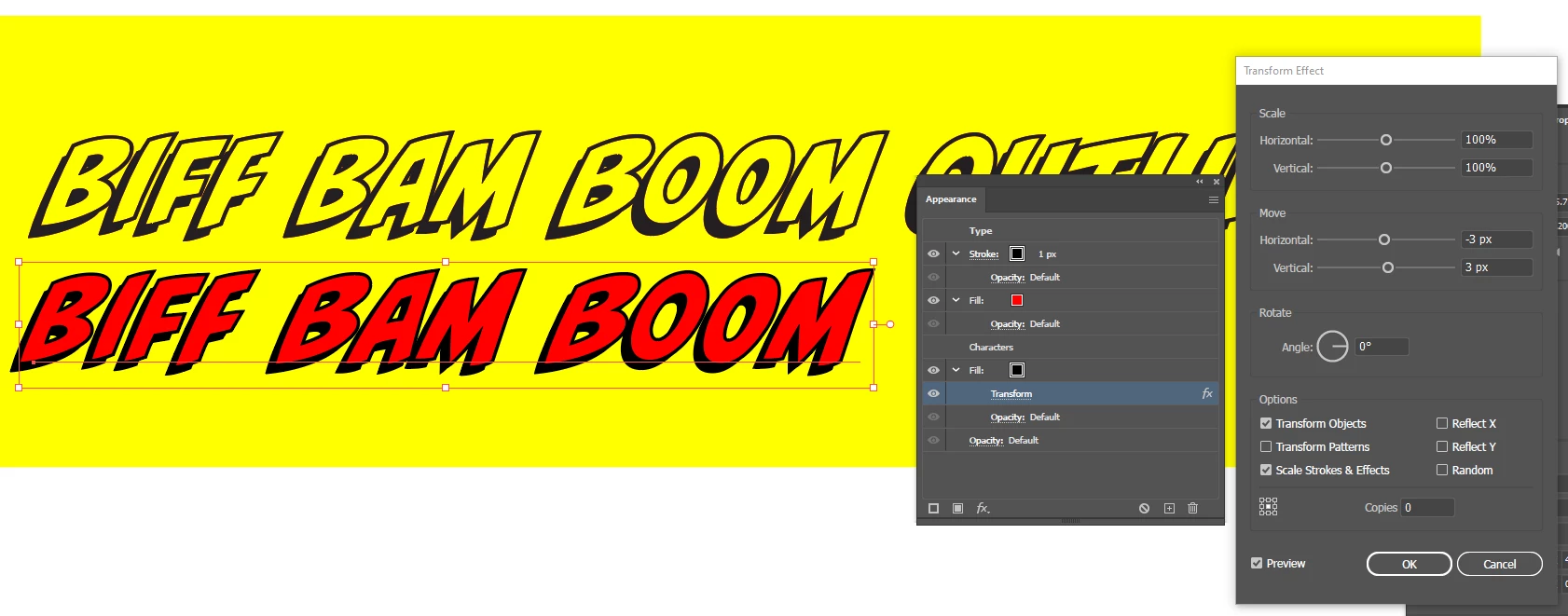
Not with the Outline version; but if you use regular Biff Bam Boom, you can set it up so it looks like the outline version, but with a fill of your choosing. Give it a stroke outline and a second fill below the characters, offset using the Transform effect.

1 reply

Doug A Roberts
Community Expert
Doug A RobertsCommunity ExpertCorrect answer
Community Expert
February 24, 2021

Not with the Outline version; but if you use regular Biff Bam Boom, you can set it up so it looks like the outline version, but with a fill of your choosing. Give it a stroke outline and a second fill below the characters, offset using the Transform effect.