
Participating Frequently
June 14, 2017
Question

Arabic Illustrator - Type functionality issues... help!

  • June 14, 2017
  • 2 replies
  • 1570 views

As a British designer living in Dubai I need the Arabic version of Illustrator to occasionally produce Arabic language versions of work.

There is a confusing and painful functionality issue that can hopefully be fixed easily.

ISSUE:

Every time you launch a new file, the software defaults to reverse justification, Arabic language and Hindi numerical settings when working with type. You constantly have to work out whats going on, characters behave un-expectedly and it's a frustrating experience in general until you change the 3 settings. Here's the thing: once you work things out and change the settings, they aren't remembered by Illustrator and revert back to Arabic every time you launch a new file. Surely we can improve this? Or at least help the user with better explanation?

See image for the default setting:
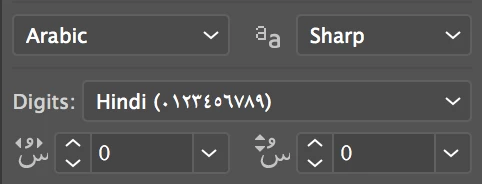
I fully appreciate, being the Arabic version your first thought would be that it defaults to Arabic language settings. But the reality is many users are designing in English as their primary language. And therefore this current functionality is not effective.

RECOMMENDATION:

Simply make Illustrator remember what your last language setting was, and leave it like that until you change it to something else.

or

Have a simple tab in the New Document' window that asks what language you'd like to work in.

I hope this can get resolved.

Thanks, Gareth

This topic has been closed for replies.

2 replies

Zaid Al Hilali
Community Expert
Community Expert
June 14, 2017

Hi Gareth,

In Adobe InDesign, we change application defaults by simply closing any open documents, change font to Gill Sans, change paragraph directions, dictionary language, and any other formatting. From there on, any new document you create in InDesign will remember your new defaults that suits Latin language users, but this is only in InDesign.

In Illustrator however it is a longer issue, to my knowledge you need to change your file profile. For instance if you use Print profile, you will have to change all defaults in a new document, name this new document as Print.ai to replace the one that comes "out of the box" with Illustrator.

Check this link of how to change Illustrator defaults on your Mac or Windows machine. I also prepared a video below to help you.

Your Dubai neighbour… Zaid

Participating Frequently
June 14, 2017

Hey man thanks, can't see any video or link.

Monika Gause
Community Expert
Community Expert
June 14, 2017

You need to create a New document profile that has these settings in the default character style (I suspect those are setting in the characters panel?)

Startup Profiles – A Great tool to Customize your New Documents « Adobe Illustrator blog

Participating Frequently
June 14, 2017

This doesn't allow you to define which language and type setting you want. Unless I'm mistaken.

Monika Gause
Community Expert
Community Expert
June 14, 2017

As long as it can be set up in the character style, it can be set up.

I don't have that language installed, can you please check the default character style and if you have any further questions, post complete screenshots and not just snippets. Thank you.