Participant
February 10, 2018
Question

Arabic language xml variable for illustrator

  • February 10, 2018
  • 2 replies
  • 1943 views

Hello all

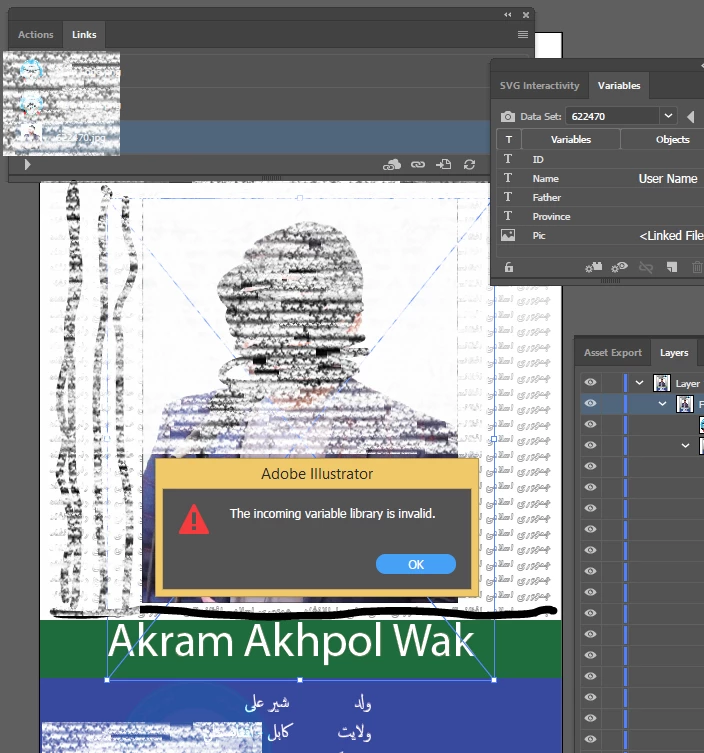
Short:  Since I am trying to generate Arabic language xml file for illustrator but when I load variable library it gives error "the incoming variable library is invalid".

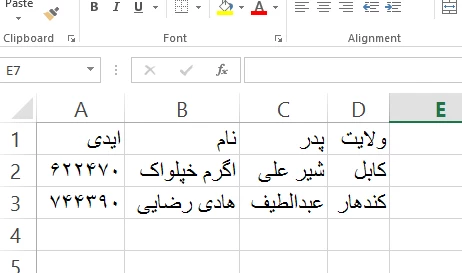
Brief: A task assigned me to make 800 id cards with same information and design but just the name of users are change in Arabic Language. Everything is going good when I type the users name in English in Excel 2013 after that I convert those data in XML for Adobe illustrator CC 2017 to load it as variable library, it work successfully. But when I follow the same steps with just change of writing users name in Arabic instate of English and when i start load variable library in illustrator it gives error " the incoming variable library is invalid ". please help me.
    This topic has been closed for replies.

    2 replies

    Silly-V
    Legend
    July 16, 2018

    I am interested to know how the VI script handles such an import, if you're still looking at the Ai variables.

    It may be that your variable names are causing the problem. On the one hand it may be that Illustrator variable feature cannot even recognize and therefore cannot import the arabic characters. But on the other hand, your variable names are specified in English in your Illustrator document, but it appears as though you have translated all of the excel text, including those names which should be left in english to automatically re-bind in your document, too.

    Adobe-Illustrator/VariableImporter.jsx at master · Silly-V/Adobe-Illustrator · GitHub

    Zaid Al Hilali
    Community Expert
    Community Expert
    February 11, 2018

    Hadi,

    This task can be done in Adobe InDesign using the Data Merge method. Arabic, Farsi, or Dari will work too. Check it out… Re: Getting Data Merge to work with Arabic text