Hamody Gannam
Participant
August 7, 2023
Answered

Arabic typing number

  • August 7, 2023
  • 1 reply
  • 810 views

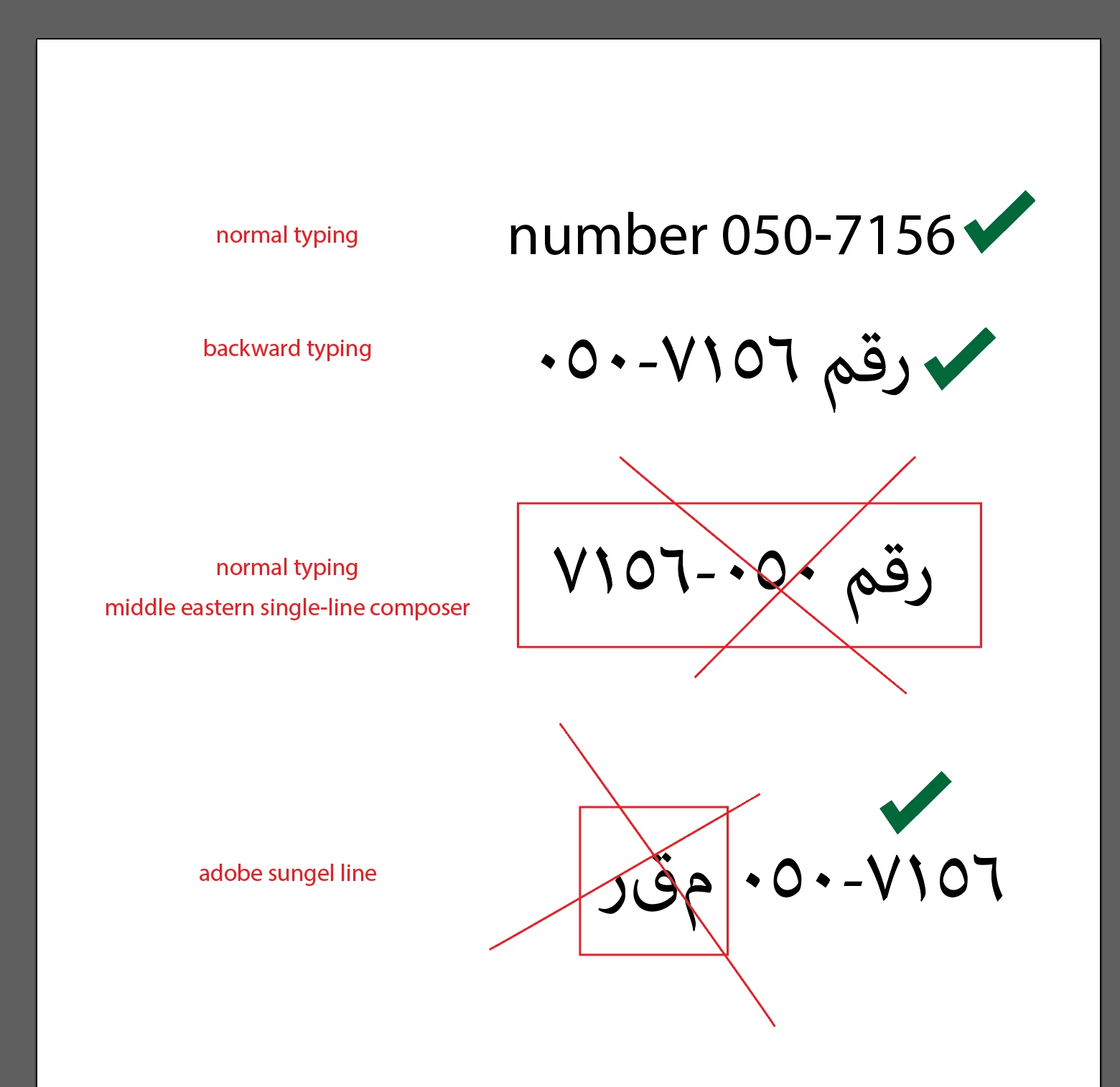
I'm trying to write an Arabic phone number with text and the director of the numbers switches when I add (-)
I already tried every then and I did uninstall and reinstall the program and the digits ( character window) still do not work I need help, please 

This topic has been closed for replies.
Correct answer Zaid Al Hilali

Marhaba Hamody. What you consider "Backward typing" is what we got used to do when we have digits mixed with dashes, slashes or parenthesis as we type Arabic (right to left).

I don't call it backward really. In Adobe Illustrator (Middle Eastern version) you will type the word رقم followed by ٧١٥٦, then a dash -, then the digits ٠٥٠

We got used to this, although it is not the same when you have Latin text.


You may also do the unrecommended method of applying the "Left-to-Right Character Direction" you can find in the Character Panel's fly-out menu. It is as follows:

  • type normally رقم هاتف ٠٥٠-٧١٥٦
  • Highlight only the digits and dash without highlighting the text
  • From the fly-out menu of the Character Panel, choose "Left-to-Right Character Direction"
  • Remember to switch back to "Default Direction" afterwards so that your subsequent text will not be messed up.


1 reply

Zaid Al Hilali
Community Expert
Zaid Al HilaliCommunity ExpertCorrect answer
Community Expert
August 8, 2023

Marhaba Hamody. What you consider "Backward typing" is what we got used to do when we have digits mixed with dashes, slashes or parenthesis as we type Arabic (right to left).

I don't call it backward really. In Adobe Illustrator (Middle Eastern version) you will type the word رقم followed by ٧١٥٦, then a dash -, then the digits ٠٥٠

We got used to this, although it is not the same when you have Latin text.


You may also do the unrecommended method of applying the "Left-to-Right Character Direction" you can find in the Character Panel's fly-out menu. It is as follows:

  • type normally رقم هاتف ٠٥٠-٧١٥٦
  • Highlight only the digits and dash without highlighting the text
  • From the fly-out menu of the Character Panel, choose "Left-to-Right Character Direction"
  • Remember to switch back to "Default Direction" afterwards so that your subsequent text will not be messed up.
Hamody Gannam
Participant
August 8, 2023

Shukran Zaid 
the "Direction" work preface for me now. I will use this in large paragraphs if it is needed

and I will keep doing the "backward typing" for small designs
hope that in the future Adobe will see this and give us a better solution 

Zaid Al Hilali
Community Expert
Community Expert
August 8, 2023

عفواً