


January 8, 2026
Question

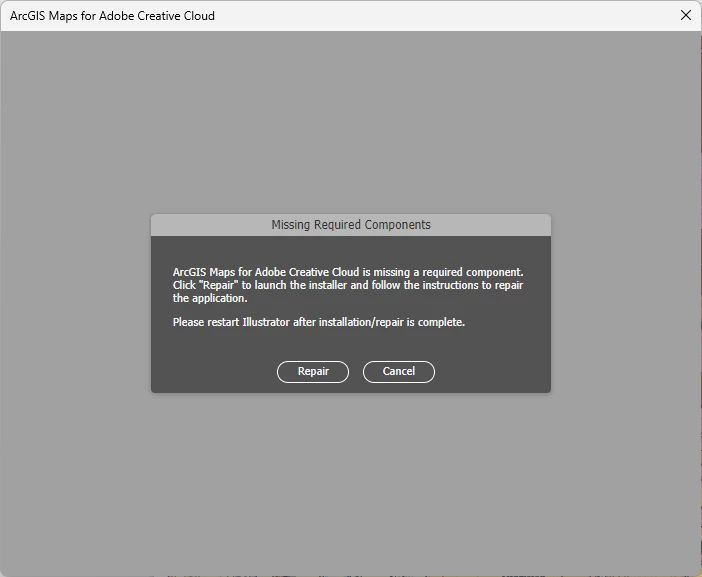
ArcGIS maps extension not working.

  • January 8, 2026
  • 4 replies
  • 117 views

I am getting a message about creative cloud missing required components. WHen I hit the repair button the program closes and nothing happens. I am runnniog ArcGIS Pro 3.6. and Illustrator 30.1. Older repair forums tell me to fix a saving option but none of this seems to be available in the creative cloud or ArcGIS world. I have unloaded and reloaded both programs and the extension to try to remedy the problem. Alas, I am hitting a block.


ANy help would be muich apprecaited.
   Dennis34076433zcnp_0-1767912662995.png


4 replies

Dave Creamer of IDEAS
Community Expert
Community Expert
January 27, 2026

The latest version of the plugin is 3.9 for Illustrator v28 and higher.

https://www.esri.com/en-us/arcgis/products/maps-for-adobecc/downloads


David Creamer: Community Expert (ACI and ACE 1995-2023)
January 27, 2026

I'm experiencing this same issue. Hope someone has found a way to resolve it! OP, please let me know if you've gotten this to work.

January 8, 2026

There is an ArcGIS Map extension for Illustrator and Photoshop that allows you to import AIX files. Which are map files created in ArcGIS that retain all layer and properties as separate elements in their own layers. Extremely helpful for loading complex maps to Illustrator for layout editing.

kglad
Community Expert
Community Expert
January 8, 2026

what's arcgis have to do with adobe apos?