This topic has been closed for replies.
Correct answer Om Nath Jha

Hi sung,

Do check with a new document (as suggested above), if the issue persists, check the exact version of Illustrator. Is it 22.0.0 or 22.0.1?

You can check it by clicking Help> About Illustrator.

Regards,

Om

5 replies

Participant
December 11, 2019

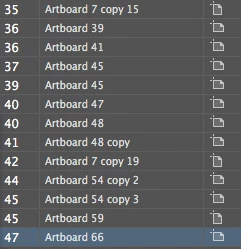
Go to Window > Artboard > Rename your artboards (*in sequence) Example: 1,2,3,4,5,6 and artboard 6 should be in artboard 1 then rename your current artboard 6 to artboard 1 then rename all the rest of your artboards in sequence.

Participant
November 14, 2017

Adobe Fix the Bug on latest update.

Thank you,

Sung

Om Nath Jha
Legend
November 14, 2017

Thanks for the confirmation Sung.

Regards,

Om

Om Nath Jha
Om Nath JhaCorrect answer
Legend
November 14, 2017

Hi sung,

Do check with a new document (as suggested above), if the issue persists, check the exact version of Illustrator. Is it 22.0.0 or 22.0.1?

You can check it by clicking Help> About Illustrator.

Regards,

Om

Nitish Agarwal
Adobe Employee
Adobe Employee
November 13, 2017

Can you reproduce it with the fresh file?

Thanks

Nitish

Mike_Gondek10189183
Community Expert
Community Expert
November 11, 2017

What OS? Looks like CC2018 by the artboard icons.

Try 

  1. rearrange artboards & arrange a single; artboard with the up down arrows
  2. quitting Illustrator and reopening the file.