


Roger Breton
Legend
Aug 30, 2024 2:11 PM UTC
Question

Art brushes don't "fully" apply to paths?

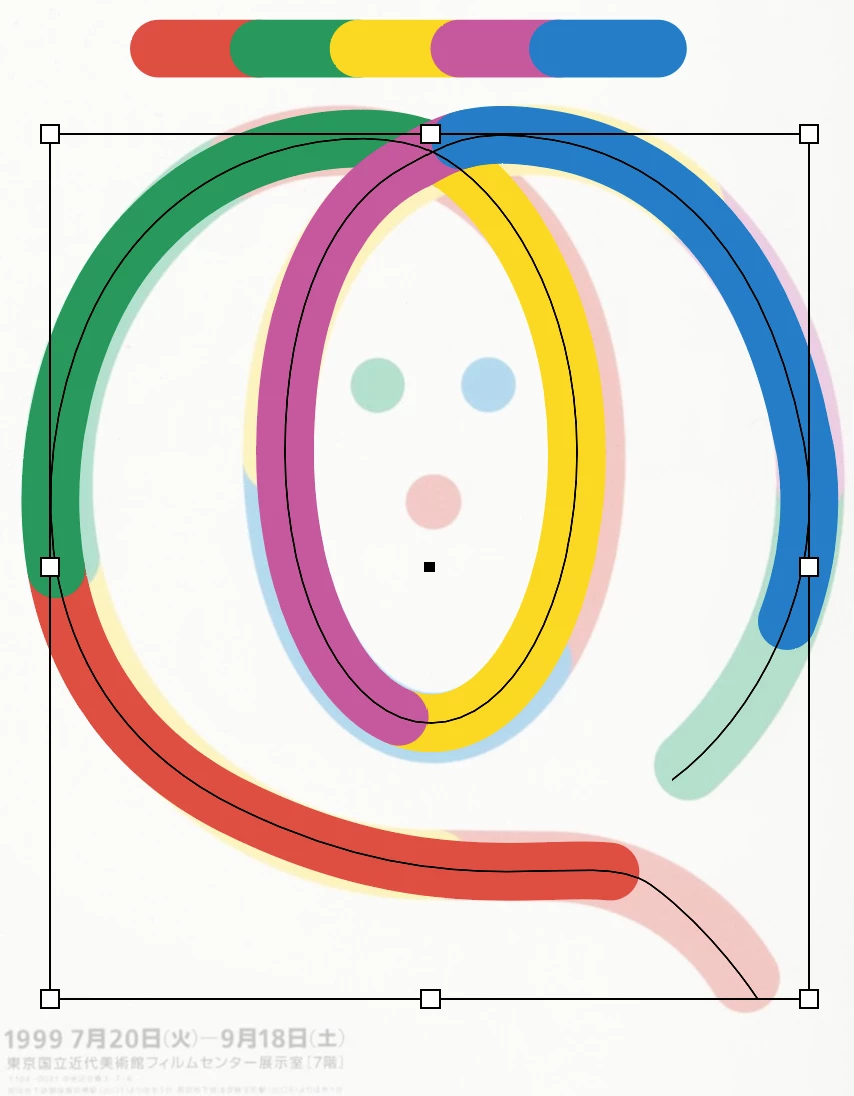
I'm not a heavy user of Art brushes but every time I try to use them I'm baffled by the way they behave? Take this example. In black, you see the extent of the path yet the brush applied does NOT completely cover its full length? I confess I have not seen any options to force the brush to apply to the full length of the path in the Art Brush dialog box?
 

Any help is appreciated. Must be something silly...


This topic is closed to new replies. Start a new post to keep the conversation going.

9 replies

Kurt Gold
Community Expert
Community Expert
Aug 30, 2024 7:46 PM UTC

You may also try it with live round cap strokes and the following Art Brush settings:


Translate
Roger Breton
Legend
Aug 31, 2024 5:06 PM UTC

Vielen Improvement! große Verbesserung!

Dank shön


Translate
Kurt Gold
Community Expert
Community Expert
Sep 1, 2024 7:37 PM UTC

With correct Stretch Between Guides settings it should even fit the stroke length perfectly in that case.


Nonetheless, the default behaviour with round cap strokes can be called a bug.

Translate
Doug A Roberts
Community Expert
Community Expert
Aug 30, 2024 2:27 PM UTC

Show the brush options and the appearance panel for the path.

Translate
Roger Breton
Legend
Aug 30, 2024 5:12 PM UTC

Sorry for the French UI


Translate
Monika Gause
Community Expert
Community Expert
Aug 30, 2024 2:13 PM UTC

Please share the file.

Translate
Roger Breton
Legend
Aug 30, 2024 5:11 PM UTC

Here is the file.
Roger Breton Art Brush.ai

Translate
Monika Gause
Community Expert
Community Expert
Aug 30, 2024 5:19 PM UTC

Interesting.

It's happening because the brush artwork are live strokes with rounded corners. I have never seen that before, so thank you for the example.


Do you need the live strokes in the brush? Sorry, dumb question - of course you need them. You could make the brush with the normal straight ends, then expand the brushstroke and round them afterwards.

Translate