
Participant
October 26, 2017
Question

Artboard not aligning with objects?
  • October 26, 2017
  • 4 replies
  • 5359 views

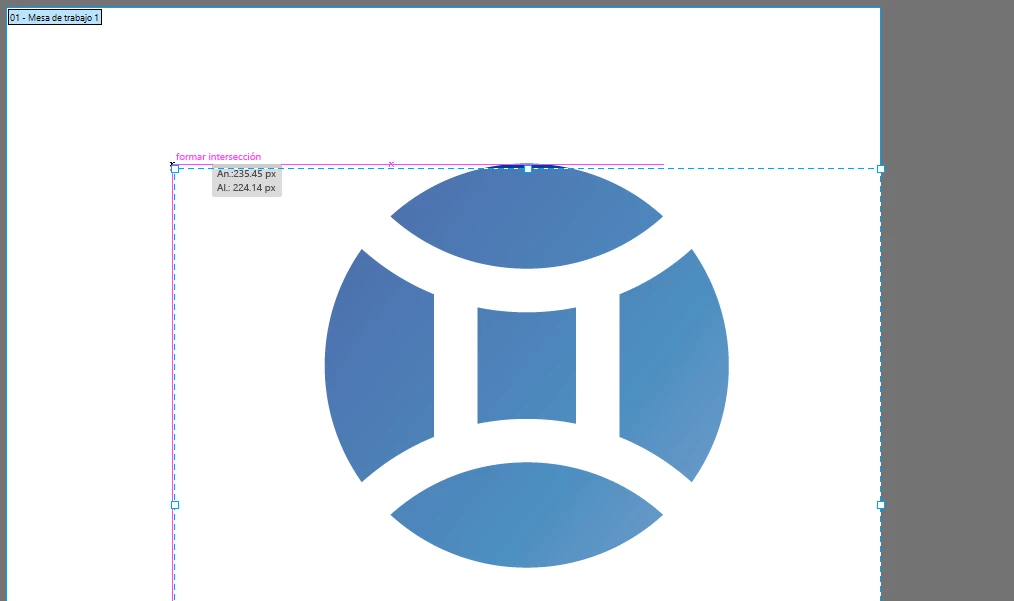
As shown in the image above, since the CC 2018 update, when resizing artboards smart guides show up when trying to align them to an illustration but the dotted line goes a couple of mm down, and it happens vertically too. Thank you in advance for the help, sorry about any mistakes i make trying to speak english, it's not my native language. And even when aling to pixel is deactivated the problem persist, but with less effect, the artboard hover like 1 mm above the object.

This topic has been closed for replies.

4 replies

GemmaHarris82
Participant
June 10, 2019

Hi there,

I had a similar issue with my artwork. If you click on the 'Align' panel options then select 'Use Preview Bounds', then reselect your artwork and then align it to centre in the artboard and this should work.  See below picture for reference.

Mike_Gondek10189183
Community Expert
Community Expert
November 7, 2017

Hi Pater,

Wanted to let you know that I also am experiencing this on AI 2018 Mac Sierra.

Daisukina mentions this may be related to align to artboard not sticking in CC2018. There is a recent update to 2018  that resolves that issue but not this one.

Will mention @AshutoshChaturvedi

as he may wish to be made aware of the artboards not snapping to artwork accurately in CC2018, as the values for selected art should be 0,0 after resetting rulers as in CC2017.

Participant
November 7, 2017

"Align to selection" was set to default after upgrading to 2018. You need to do the following steps (attached pictures) to change it back to "Align to Artboard"

Mike_Gondek10189183
Community Expert
Community Expert
October 26, 2017

I am still at work so don't have 2018 in front of me, but try the preset "fit to selected art".

Participant
October 26, 2017

Not at home right now, but I'll inform you asap if it works.