


Participant
June 24, 2025
Answered

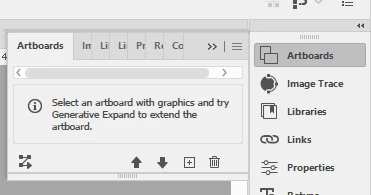
Artboards do not populate in Artboard Panel

After recent Illustrator update (last week), my artboards no longer show up in the Artboard panel. Instead, where the artboard list would normally populate, this is what appears. I have "Show Artboards" selected and I have not changed anything in my Workspace settings. Any help would be greatly appreciated. 


Anubhav M
Anubhav MCorrect answer
Community Manager
June 25, 2025

Hello @beckyf7157061,

Could you try expanding the Artboards panel horizontally to see if it helps?

Looking forward to hearing from you.
Anubhav

2 replies

Anubhav M
Community Manager
Anubhav MCommunity ManagerCorrect answer
Community Manager
June 25, 2025

Hello @beckyf7157061,

Could you try expanding the Artboards panel horizontally to see if it helps?

Looking forward to hearing from you.
Anubhav

Translate
Participant
June 25, 2025

Hey, that worked. I'm sorry I didn't think to do that. I guess because until this recent update, I never had to expand it. Appreciate your help!

Translate
