


Participating Frequently
July 2, 2025
Question

Artifacts appear when using Offset Path on traced objects from Photoshop

  • July 2, 2025
  • 3 replies
  • 900 views

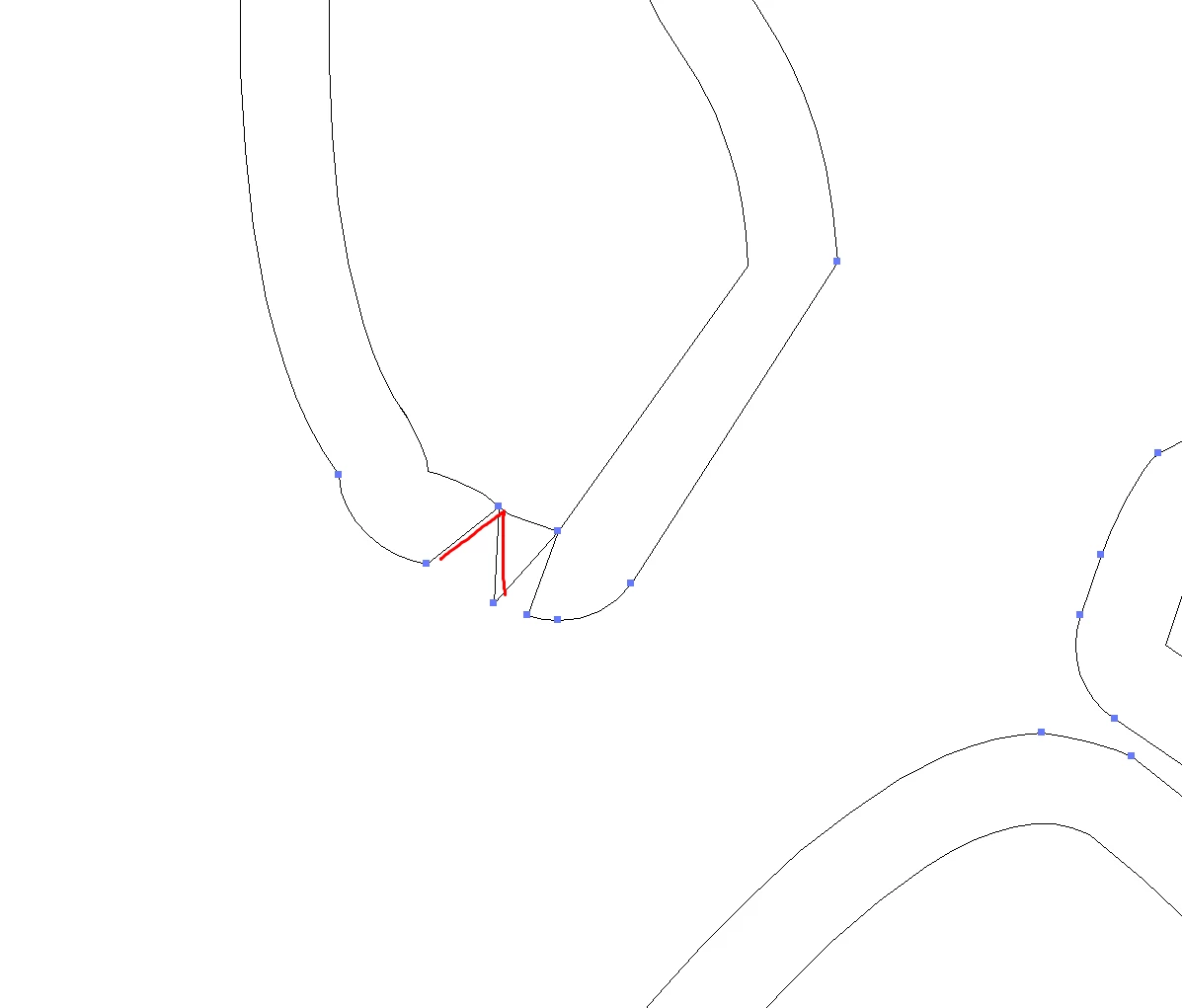
Hello, dear friend. I encountered a problem in the Illustrator 28.7.1 (64-bit) program when compressing and expanding complex objects using the 'Offset path' command with a step of 0.05 mm.
The image was obtained using tracing through the Photoshop 25.12.0 program.
A large number of artifacts appear that interfere with the work.
 

<Title renamed by MOD>

3 replies

Monika Gause
Community Expert
Community Expert
July 2, 2025

Your base paths are made wth autotracing?

You probably want to first clean that up. Try using Simplify in Illustrator before Offset path.

Sergei_DAuthor
Participating Frequently
July 2, 2025

Данная операция не всегда уместна и помогает с переменным успехом.

Bill Silbert
Community Expert
Community Expert
July 2, 2025

Do you get the same results if you turn off GPU Performance in the Performance section of your Illustrator Settings (Preferences)?

Sergei_DAuthor
Participating Frequently
July 2, 2025

I have known about this problem for a long time, I have been facing it from version to version for more than 5 years.
I have not tried changing this setting.
In the response to another message, there is also a PDF file in the body of the letter, with which you can practice on your computer.

Abhishek Rao
Community Manager
Community Manager
July 2, 2025

Hi @Sergei_D,


Thank you for sharing these details and screenshots. I understand how frustrating these unexpected artifacts can be when working with offset paths.

Could you please confirm which operating system you are using? It would also be great if you could try this in the latest Illustrator version, for example 29.6.1, to see if the issue still occurs there.

Could you also let me know if this happens with all traced images or only with this specific one? Additionally, if possible, please share the original AI or PSD file (or a small sample of it) along with a short screen recording showing your exact steps, so I can further check this with the team.

Also, please let me know whether you're using any custom plugins or third party tools in your workflow.


Looking forward to your update!

Abhishek 

Sergei_DAuthor
Participating Frequently
July 2, 2025

Good day for you.
OS Windows 11 Pro
The new version of the illustrator must again be configured, and I didn’t like it with something and why if the current one works excellently with the exception of the aforementioned moment.
I put any images in Photoshop, but this does not happen to everyone. It didn’t work out to find a relationship. Earlier in the body of the first post, he applied the file in PDF recorded it from the program while saving layers. Link for download https://dropmefiles.com/kbj01
I have a clean version without plugins.