Artwork from Library contains unexpected imagery.
Short story: Dragging artwork from the Library onto an art board (Ai) or onto a page (Id) reveals imagery that was not part of the original artwork.
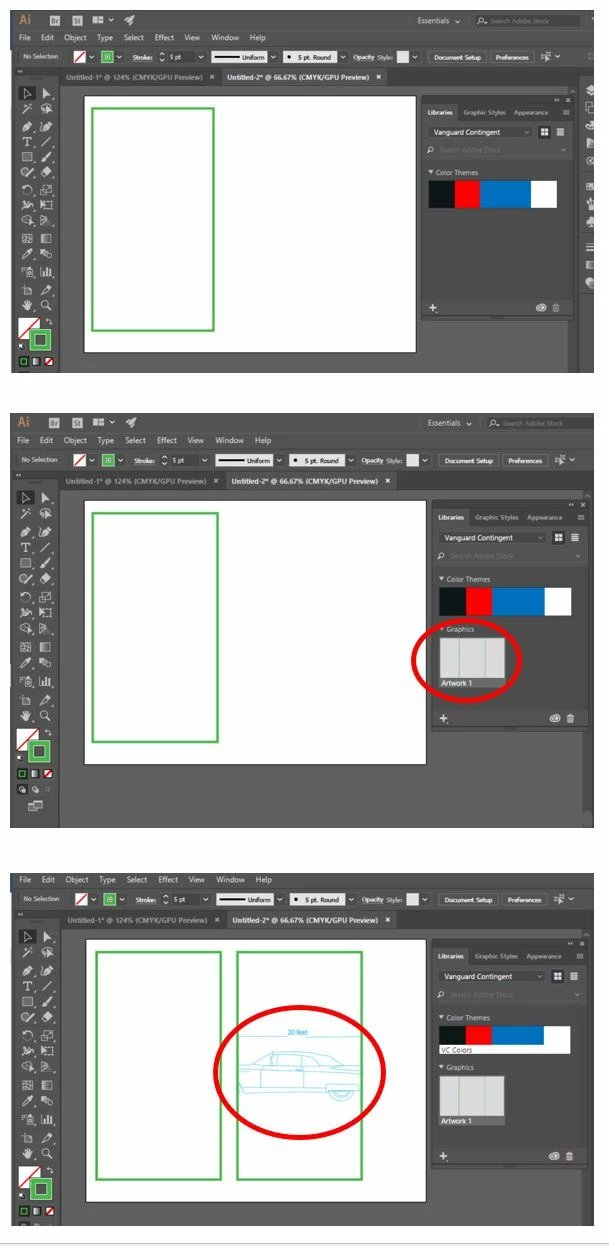
Example Walk-thru: I open Illustrator and create a new blank document. I draw one rectangle with a green stroke and no fill. So, there's just one element on one layer - nothing else. I select all and drag it into the library. I go to the Library and see my green-stroke rectangle. I drag it from the Library back onto the art board. The pasted artwork contains the rectangle that has the green stroke and empty fill... BUT, it now also includes imagery from an illustration that was done a long time ago. Bear in mind that the unexpected imagery was not part of the original Ai document - which was blank when I added the green-stroked rectangle. Also note that if I 'select-all" and copy then paste, then it reproduces faithfully (without unexpected imagery). Is the unexpected imagery based on a template? An invisible / hidden artwork? A corrupted preference file?
 AdChoices