
Participant
August 26, 2024
Answered

Assigning keyboard shortcut to show/hide contextual taskbar

  • August 26, 2024
  • 1 reply
  • 334 views

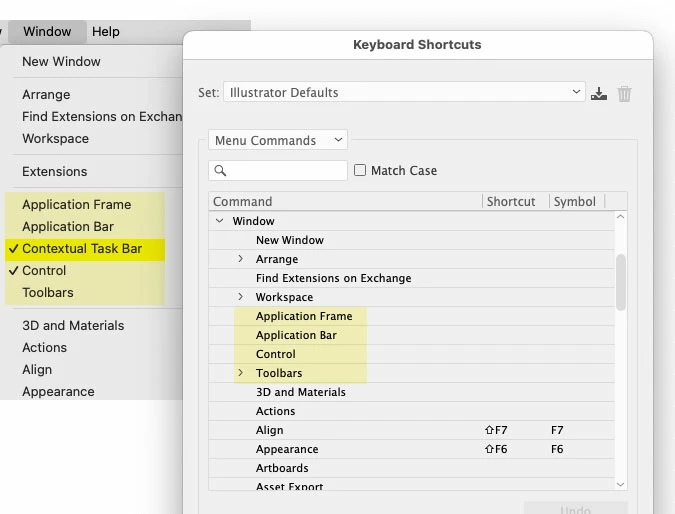
I find the new contextual taskbar useful in certain circumstances, but mostly distracting and in the way. So I thought it would be a good idea to assign a custom keyboard shortcut to show/hide the thing. Turns out it is missing from the list of commands in the Keyboard Shortcut editor. Any idea why?
 

Correct answer Anubhav M

Hello @Prof AOK,

Thanks for reaching out. Illustrator currently does not support assigning a keyboard shortcut for enabling/disabling the Contextual Task bar. Would you mind creating a UserVoice for this feature request (https://adobe.ly/3Z7Qos2) and adding your comments there? Doing this will help us prioritize this request, and you will be notified of any updates.


Feel free to reach out if you have more questions or need assistance. We'd be happy to help.


Thanks,

Anubhav

1 reply

Anubhav MCommunity ManagerCorrect answer
Community Manager
August 27, 2024

Hello @Prof AOK,

Thanks for reaching out. Illustrator currently does not support assigning a keyboard shortcut for enabling/disabling the Contextual Task bar. Would you mind creating a UserVoice for this feature request (https://adobe.ly/3Z7Qos2) and adding your comments there? Doing this will help us prioritize this request, and you will be notified of any updates.


Feel free to reach out if you have more questions or need assistance. We'd be happy to help.


Thanks,

Anubhav