Participant
August 3, 2018
Answered

Auto-arrange per Y value (position)

  • August 3, 2018
  • 2 replies
  • 5369 views

Hi! I have a question:

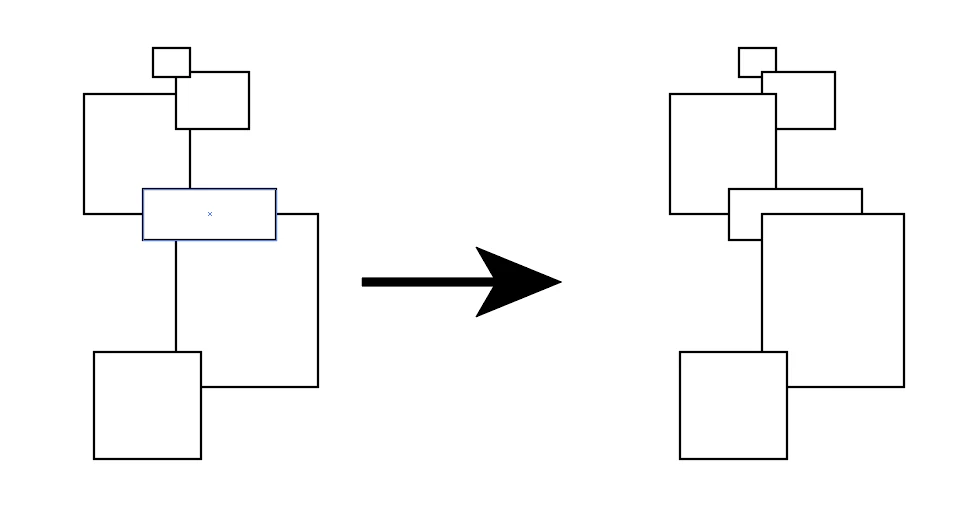
I wonder if there's a way to select a group of objects (in the same layer) and auto-arrange them based on each object's Y value (vertical position on the page).

This would be helpful in creating basic perspectives.

Perhaps a script?

Thanks!

This topic has been closed for replies.
Correct answer Disposition_Dev

not the prettiest thing int he world, but it does the trick. give this a shot:

function test()

{

    if(!app.documents.length)

    {

        alert("You must have a document open.");

        return;

    }

    var docRef = app.activeDocument;

    var sel = docRef.selection;

    if(!sel.length)

    {

        alert("You must make a selection.");

        return;

    }

    function sortVertically(items)

    {

        var topMost,curY,delIndex,curItem,tempItems = [];

        for(var x=0,len=items.length;x<len;x++)

        {

            tempItems.push(items);

        }

        while(tempItems.length)

        {

            topMost = tempItems[0];

            curY = topMost.top;

            delIndex = 0;

            for(var x=1, len = tempItems.length;x<len;x++)

            {

                curItem = tempItems;

                if(curItem.top > curY)

                {

                    topMost = curItem;

                    curY = curItem.top;

                    delIndex = x;

                }

            }

            topMost.zOrder(ZOrderMethod.BRINGTOFRONT);

            tempItems.splice(delIndex,1);

        }

    }

    sortVertically(sel);


}

test();

2 replies

templatemaker-nl
Inspiring
June 22, 2021

Based on the work by @Disposition_Dev and @femkeblanco, I wrote a more verbosely commented script and added the possibility to sort by any property. For sake of legibility, I used the JavaScript 'sort' function. I hope this helps.

function main() {
  // Check if there is an open document with a selection
  if (!app.documents.length) {
    alert("You must have a document open.");
    return;
  }

  var docRef = app.activeDocument;
  var sel = docRef.selection;

  if (!sel.length) {
    alert("You must make a selection.");
    return;
  }

  // Prompt the user for the sorting criterion
  var criterion = prompt("What property do you want to sort by? E.g. top, left, width, height, opacity, name:", "top");

  // If the property has a minus sign, the user wants to sort in reverse order. (*1)
  var sortOrder = 1;
  if (criterion[0] === "-") {
    sortOrder = -1;
    criterion = criterion.substr(1);
  }

  //  Make a copy of the array containing the selection:
  var items = [];
  for (var i = 0; i < sel.length; i++) {
    items.push(sel[i]);
  }

  // Sort the array by the criterion
  items = items.sort(dynamicSort(criterion));

  // iterate the array in reverse order while moving every element to the top:
  for (var i = items.length - 1; i >= 0; i--) {
    if (sortOrder === 1) {
      items[i].zOrder(ZOrderMethod.BRINGTOFRONT);
    } else {
      items[i].zOrder(ZOrderMethod.SENDTOBACK);
    }
  }
}

// Sorting function
function dynamicSort(property) {
  // Adapted from: https://stackoverflow.com/a/4760279/960592 (Credit: Ege Özcan)
  // (Adobe's Javascript doesn't seem to like double ternary operator)

  return function (a, b) {
    if (a[property] < b[property]) {
      return -1;
    }

    if (a[property] > b[property]) {
      return 1;
    }

    return 0;
  }
}


main();

/* 
Note: It *should* be possible to just reverse the array (items.reverse() ) or to change the sorting order in
the sorting function, but I couldn't get either method to work. This is a work-around.
*/
femkeblanco
Legend
June 22, 2021

I should have made it clear that the above was @Disposition_Dev 's script, I just updated it. It is my understanding that migrating to the present forum in late 2019 impaired scripts, including causing loss of indices of elements. The script was evidently working up until that point.

templatemaker-nl
Inspiring
June 22, 2021

Is that also the reason that there is no formatting on code in older posts?

Disposition_Dev
Disposition_DevCorrect answer
Legend
August 3, 2018

not the prettiest thing int he world, but it does the trick. give this a shot:

function test()

{

    if(!app.documents.length)

    {

        alert("You must have a document open.");

        return;

    }

    var docRef = app.activeDocument;

    var sel = docRef.selection;

    if(!sel.length)

    {

        alert("You must make a selection.");

        return;

    }

    function sortVertically(items)

    {

        var topMost,curY,delIndex,curItem,tempItems = [];

        for(var x=0,len=items.length;x<len;x++)

        {

            tempItems.push(items);

        }

        while(tempItems.length)

        {

            topMost = tempItems[0];

            curY = topMost.top;

            delIndex = 0;

            for(var x=1, len = tempItems.length;x<len;x++)

            {

                curItem = tempItems;

                if(curItem.top > curY)

                {

                    topMost = curItem;

                    curY = curItem.top;

                    delIndex = x;

                }

            }

            topMost.zOrder(ZOrderMethod.BRINGTOFRONT);

            tempItems.splice(delIndex,1);

        }

    }

    sortVertically(sel);


}

test();
Participant
August 3, 2018

Thank you very, very much!

Worked like a charm!