
iwm_evan
Participant
November 6, 2017
Answered

Auto-Kerning on selection not allowed, since when!?!!

  • November 6, 2017
  • 5 replies
  • 18620 views

The newest version of Adobe Illustrator seems to have a problem with auto/optically kerning my font's. Can someone tell me if something's broken or if I did something wrong. It seems like something is broken because I can't even click ok to clear the alert that pops up. This is a screen grab of the error I am getting. I totally understand what it is saying I have just never had this problem before in the old Illustrator.

I don't even get a chance to hover over the auto selection and this pops up.
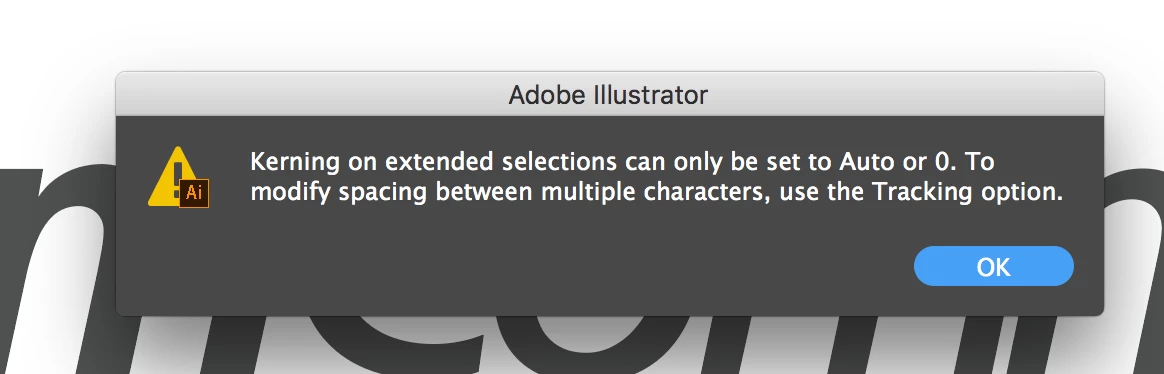
    Correct answer AshutoshChaturvedi

    We have a fix and is available in the pre-release build. Please visit http://adobe.ly/1Q3rCPI and get the latest build titled Adobe Illustrator CC 22.0.2  - Hot Fix.

    This build is of production quality. Please feel free to use / recommend it for your day to day activity.

    Warm Regards,

    Ashutosh Chaturvedi | Sr. Quality Engineering Manager – Illustrator

    5 replies

    Participating Frequently
    October 19, 2023

    Hi all, I've got this issue today , 2023.


    Using Windows 10 (10.0.19045)


    Can't find a soltution on the net, just lots of people complaining about it since 2017.  


    When I use the selction tool to select the font and click V/A to adjust kerning I get the error. 

    Participating Frequently
    October 19, 2023

    in version 28.0, which I ecently updated to.  Going to uninstall and try prev version

    Monika Gause
    Community Expert
    Community Expert
    October 19, 2023

    Exactly where do you click?

    I have no problems setting it to Auto or Optical

    CozyMiel
    Participant
    December 14, 2020

    I'm sorry to say, this is still an issue and its 3 years later... I was using illustrator regularly earlier this year (On a mac) and wasn't having any problems. Now I'm on a PC and I've just started up using illustrator again, How can I fix this?

    (added my own screenshot)

    captainredbeard
    Participant
    May 26, 2023

    still an issue, 3 more years.... Just happened to me. 😞 

    Monika Gause
    Community Expert
    Community Expert
    May 26, 2023

    Exactly what did you select?

    AshutoshChaturvedi
    Community Manager
    AshutoshChaturvediCommunity ManagerCorrect answer
    Community Manager
    December 12, 2017

    We have a fix and is available in the pre-release build. Please visit http://adobe.ly/1Q3rCPI and get the latest build titled Adobe Illustrator CC 22.0.2  - Hot Fix.

    This build is of production quality. Please feel free to use / recommend it for your day to day activity.

    Warm Regards,

    Ashutosh Chaturvedi | Sr. Quality Engineering Manager – Illustrator

    Participant
    November 11, 2017

    Did you happen to figure this out? I paste graphs from Excel into Illustrator and have always used the Auto or Optical Kern option. With this update 22.0.1, I can't do it no matter how I select the type. I'm getting the same error message you received and extremely frustrated.

    iwm_evan
    iwm_evanAuthor
    Participant
    November 11, 2017

    So. I manually kerned some letters, and then I went to click the Auto, Metrics, or Optical button to reset. I have not been able to find a way to reverse my manual kern by clicking the obvious buttons. My best solution so far is reverting to ver 21 of Adobe until they have this sorted.

    The reason I don't think this is some new feature or possible an OS is because when I open Photoshop, InDesign and even After Effects the option to return to a preset kern works.

    S_Gans
    Community Expert
    Community Expert
    November 6, 2017

    Hi. Please let us know which operating system you're using. For me, on MacOS 10.12.6 Sierra, it works just as expected:

    Adobe Community Expert / Adobe Certified Instructor
    michelew83603738
    Community Expert
    Community Expert
    November 6, 2017

    You are highlighting characters rather than selecting them where you see the baseline. You need to press escape in order to get out of this and yes it happens to me as well. This did not happen in older versions of Illustrator, but you are supposed to select, not highlight the text when changing the auto-kerning/optical/metrics. You will get this same waring if you highlight individual letters that you are trying to kern, even in older versions of Illustrator.