
Inspiring
February 15, 2019
Answered

Auto resize text to fit into a box

  • February 15, 2019
  • 3 replies
  • 2223 views

I currently have a text box like so:

I would like it to be when I type something in this box that it'll fit the maximum amount of space width wise that it could.  In this example it would create this:

From another thread I saw that someone recommended it doing it from here:

Type > Area Type. 

I'm using illustrator cc 2019 and that is not an option under Type.  Can any one let me know how this can be done please?
This topic has been closed for replies.
Correct answer jane-e

Hi

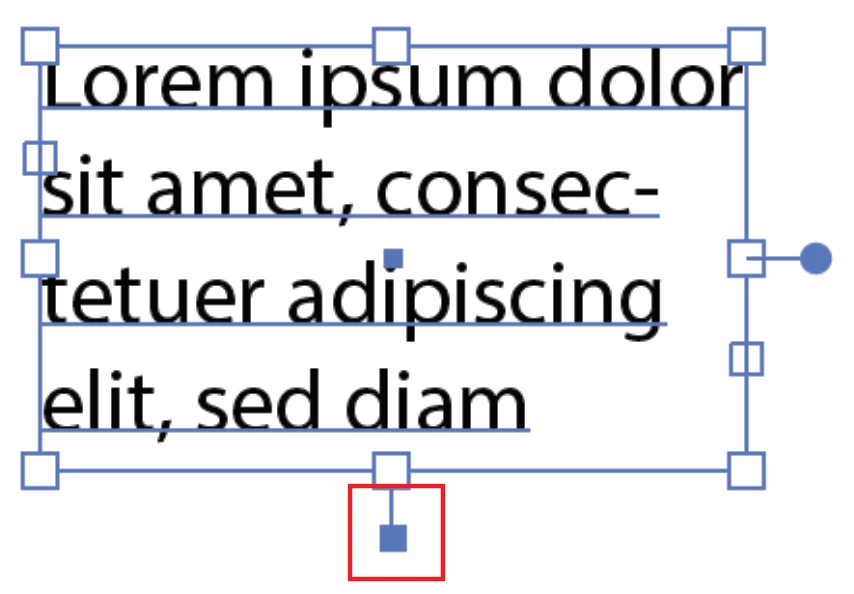
Auto-size only works with Area Type in Illustrator. Double-click the widget at the bottom. It does not work the way you are asking — it makes the frame fit the text, not vice versa.

~ Jane

3 replies

jane-e
Community Expert
jane-eCommunity ExpertCorrect answer
Community Expert
February 17, 2019

Hi

Auto-size only works with Area Type in Illustrator. Double-click the widget at the bottom. It does not work the way you are asking — it makes the frame fit the text, not vice versa.

~ Jane

CarlosCanto
Community Expert
Community Expert
February 16, 2019

it could be scripted.

check this thread for an awesome way of doing it manually using envelopes, would that work for your needs?

Re: Resize Text in a static textbox size.

Monika Gause
Community Expert
Community Expert
February 15, 2019

Illustrator has no feature like this.

I'm not aware of a script either.