
Participating Frequently
January 29, 2024
Question

Auto trace function in Illustrator
  • January 29, 2024
  • 2 replies
  • 776 views

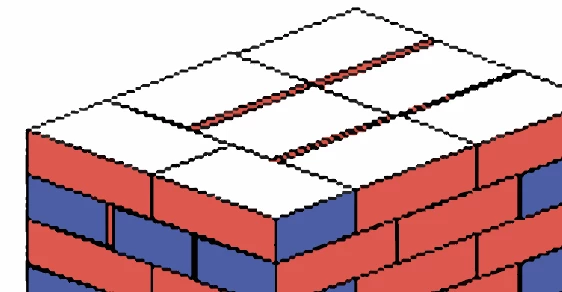
Any way to use the image trace function in Illustrator to work on above image to become vector format and all the lines become a straight line instead of draw it manually.


[Moderator moved the thread to the correct forum]

This topic has been closed for replies.

2 replies

Jacob Bugge
Community Expert
Community Expert
January 29, 2024

Groovy,


Basically, you can just draw one brick, and then build everything using Effect/Transform operations (move/reflect) starting from the bottom one at the nearest corner, and then a bit of recolouring.


Apart from everything else, the image is inconsistent/irregular, so it would be impossible to build on it, no pun intended.

Groovy HOAuthor
Participating Frequently
January 30, 2024

Thanks everyone for your reply, the best effect which I can do is as below. However, the line is still not straight enough.

Monika Gause
Community Expert
Community Expert
January 30, 2024

That's all you can get. So what exactly is so difficult about it that you cannot just draw it? Can we see the bigger picture?

Abambo
Community Expert
Community Expert
January 29, 2024

I'll move this from the Acrobat forum to the Illustrator forum. 


Autotrace is not a "fit it all" function. It probably fails to provide good results on your asset shown. A manual trace is probably faster than having to manually correct the autotrace errors.

ABAMBO | Hard- and Software Engineer | Photographer
Groovy HOAuthor
Participating Frequently
January 29, 2024

Thanks but since it is a huge amount quantity need to work on, so if all using manual trace will need to spend a really long time. That's why want to see if any faster or auto-trace way to shorten the time needed.

Monika Gause
Community Expert
Community Expert
January 29, 2024

Forget autotrace.


Can we see the bigger picture? What is the huge amount?