Participant
November 18, 2020
Answered

Automate width of clipping mask to re-linked image

  • November 18, 2020
  • 3 replies
  • 948 views

Hello! I'm looking for a script to help me automate a lot of things so my client can update the poster themselves, and I really hope someone can help me. If a new script needs to be created I'm also willing to hire the right person.


I'm looking to do the following: 

  1. Replace a book cover img with another book cover (See attached poster example design)
  2. When replacing the book cover, I want the height of the book to be fixed, but the width should adapt to the witdh of the new book cover image. 
  3. The book illustration should adapt to the new width of the book cover just replaced. Meaning the illustrated book should be "dragged" to fit the width.

Any tips on how to accomplish this? 


Thank you!! 
This topic has been closed for replies.
Correct answer Silly-V

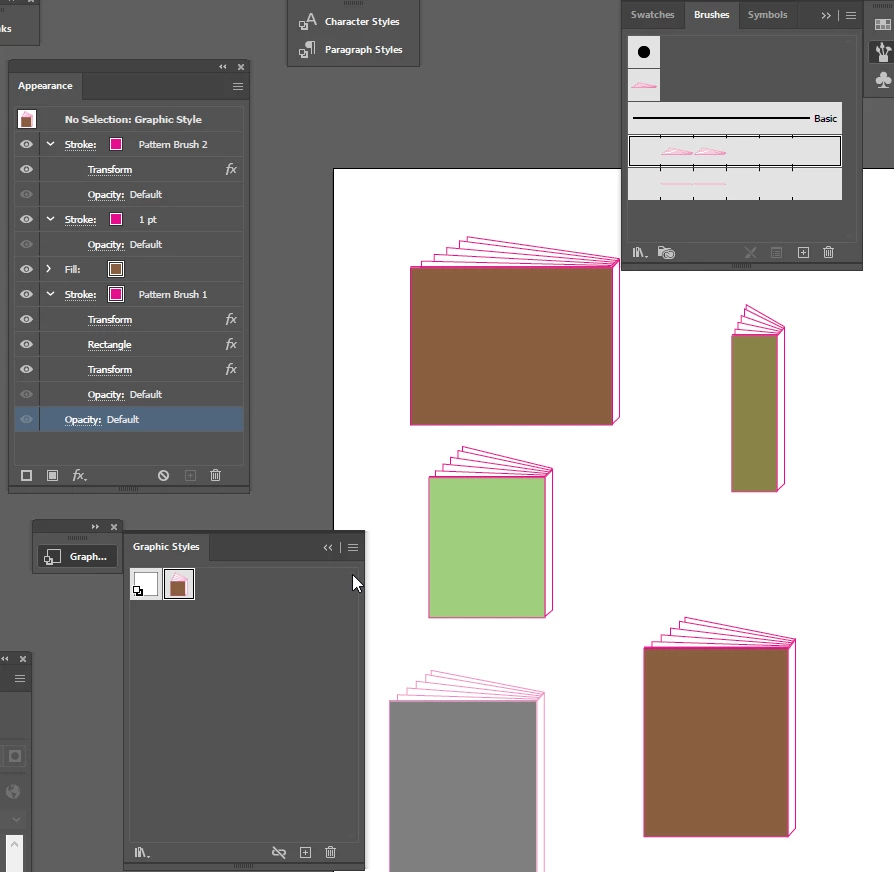
You could try making a graphic style with some advanced techniques such as creating a pattern brush and tweaking it just so inside appearance strokes to get a desired effect.

See file here:

https://www.dropbox.com/s/d9ovwth62xr03vb/Book%20Outside%20Graphic%20Style.ai?dl=0

3 replies

Silly-V
Silly-VCorrect answer
Legend
November 25, 2020

You could try making a graphic style with some advanced techniques such as creating a pattern brush and tweaking it just so inside appearance strokes to get a desired effect.

See file here:

https://www.dropbox.com/s/d9ovwth62xr03vb/Book%20Outside%20Graphic%20Style.ai?dl=0

Participant
November 26, 2020

Hi @Silly-V 


Wow that looks really interesting! Thank you for the file. Would you be able to use this pattern brush / Graphic style in inDesign though? Thanks for the helpful and fast reply.


Silly-V
Legend
November 27, 2020

No, this is one of those features unique to Illustrator. InDesign has some rudimentary brush mechanism but the same effect would need to be achieved in some other crazy way within InDesign - if it's even possible.

ceyhun_akgun
Legend
November 25, 2020

In this regard, I recommend you to use InDesign Auto Fitting options.
I will share some links to give you an idea about the application.

https://www.youtube.com/watch?v=zyWFQMUausQ&ab_channel=InDesignSecrets

https://www.youtube.com/watch?v=9tljWr5kNUM&ab_channel=MichaelBullo


Graphic Designer Educator / PrePress Consultant
Participant
November 26, 2020

Thank you @ceyhun_akgun  I'll take a look into that auto fit!

Disposition_Dev
Legend
November 19, 2020

can you share an example of what it would look like at the end? i'm not sure i follow what you mean by "dragged to fit".

will it only be that "cover" rectangle that scales, or the entire book illustration (causing a bit of skewing depending on how much it has to stretch/shrink). 


do you want to keep the left side of the book aligned where it is, and then stretch the book to the right to accomodate the linked image inside it?

Participant
November 25, 2020

Hi @Disposition_Dev 


I've switched to InDesign in the meantime and am working with a developer to build a script to accomplish what I'm looking for. But.. I still stumble when trying to get the book illustration to adapt to the book cover size. So.. this is what I'm looking to achieve: 


One book cover pasted into the book cover frame, and it should look like this: 

When another book cover is pasted within the frame that is less tall, it should like this: 


So.. 

  1. I want to keep the width of the book.
  2. The book cover should fit to the bottom within the frame
  3. The frame should adapt in the height to the new book cover dimensions 
  4. The top part of the illustrated book pages and book spine should also adapt to the height of the book.. in this example it should move down.. 


Any idea how to achieve this?