
Known Participant
January 30, 2019
Answered

Automatically Overprint ON in Gradient

  • January 30, 2019
  • 3 replies
  • 1327 views

Hi,

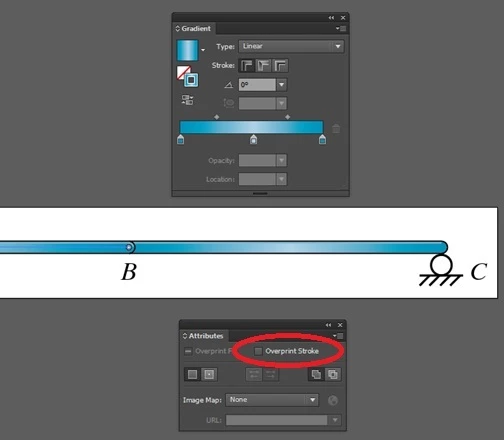
We have disabled Overprint in Gradient stroke for the particular eps. But once we save the eps file and again open the same eps in illustrator, automatically overprint enabled.

Due to this we have received quality issue in Printer. So please let me know how to disable overprint for Gradient Stroke.
Regards

Jayesh

    This topic has been closed for replies.
    Correct answer ceyhun_akgun

    Very similar to this issue I have reported. After the gradient is applied to the line and overprint feature is given. The overprint feature given to this gradient disappears when the document is opened again. This is an important problem. It causes errors due to its use in the label and packaging industry.

    3 replies

    Srishti_Bali
    Legend
    January 31, 2019

    Hi Jayesh,

    Sorry to hear about the issues you are facing, I tried but could not reproduce the issue at my end by following the steps you shared.

    I would request if you can share a few more details like:

    • Operating system(Exact version of Windows/MAC)
    • Exact version of Illustrator
    • Is it happening with a particular file or multiple files? Check if the same thing happens on new file as well?
    • Please share step by step workflow or share a small video of the issue.

    Regards,

    Srishti

    ceyhun_akgun
    ceyhun_akgunCorrect answer
    Legend
    January 31, 2019

    Very similar to this issue I have reported. After the gradient is applied to the line and overprint feature is given. The overprint feature given to this gradient disappears when the document is opened again. This is an important problem. It causes errors due to its use in the label and packaging industry.

    Graphic Designer Educator / PrePress Consultant
    Srishti_Bali
    Legend
    January 31, 2019

    Hi Ceyhun,

    I would request if you can share the reproducible steps and also report this to Adobe Illustrator Feedback form.

    Regards,

    Srishti

    Kurt Gold
    Community Expert
    Community Expert
    January 30, 2019

    I'm not quite sure if I understand your request. Can you elaborate? Can you perhaps even provide at least one sample file that may clarify your issue.

    Also, which version of Illustrator are you using?