florenciagaete
Participant
February 24, 2022
Question

Ayuda- comandos illustrator

  • February 24, 2022
  • 3 replies
  • 665 views

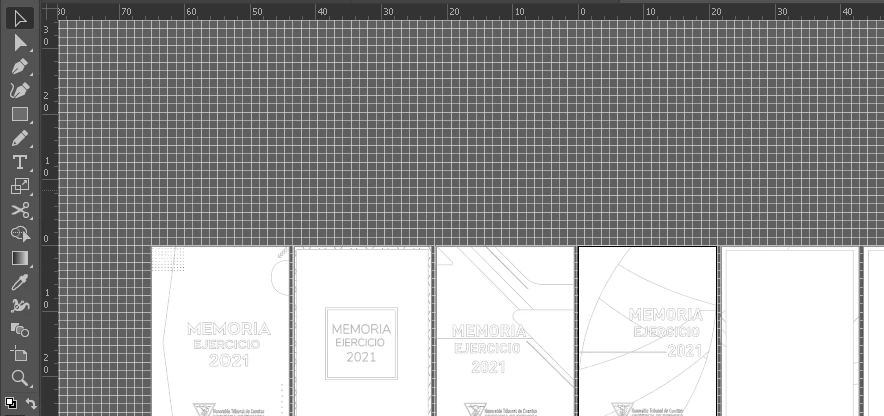
Hola! alguien sabe como puedo deshacer este comando? Se activó una cuadricula y una especie de contornos. Parecido al comando Ctrl+y para Alternar la previsualizar contornos y GPU del documento

This topic has been closed for replies.

3 replies

Jeff Witchel, ACI
Community Expert
Community Expert
February 24, 2022

As mentioned above, go to the View menu and choose Hide Grid. But when you do, make sure to uncheck Snap to Grid as well. Or you will get the odd behavior of objects snapping to a grid you can no longer see.

GerssonDelgado
Inspiring
February 24, 2022

Hola, Click derecho en documento


florenciagaete
Participant
February 24, 2022

Hola! sii pero además de la cuadricula mi trabajo a pasado a  mostrar solo los "contornos" en negro

Jeff Witchel, ACI
Community Expert
Community Expert
February 24, 2022

Then go to View > Preview.

m1b
Community Expert
Community Expert
February 24, 2022

Hi @florenciagaete, Is it the menu View > Hide Grid? I'm not sure—it looks different to the way my grid looks.

- Mark

florenciagaete
Participant
February 24, 2022

Hola! Si pero además de la cuadricula mi trabajo a pasado a mostrar solo los "contornos" en negro

m1b
Community Expert
Community Expert
February 24, 2022

Also have a look at this article.

- Mark