November 17, 2017
Question

Ayuda Urgente: Archivo no recuperado correctamente

  • November 17, 2017
  • 1 reply
  • 244 views

Hola, estaba trabajando en un archivo de tres capas (una con imágenes linkeadas y la otra con vectores, cabe aclarar que no tenía nada de cuadros de texto por ninguna parte del archivo).

Guardé y luego mi computador se apagó por un fallo de energía. Al abrir el programa, mi archivo sale en los recientes, como se puede ver:

Sin embargo, al dar clic, estos cuadros aparecen:
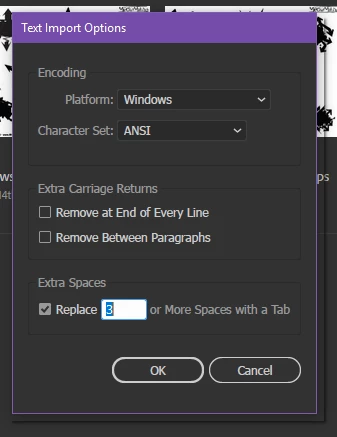
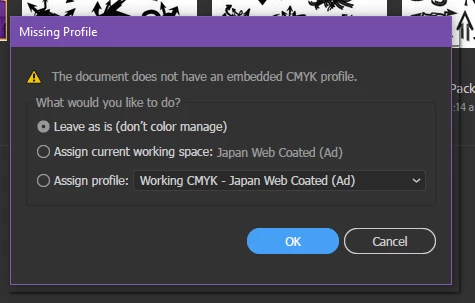
Al abrir el archivo, está en blanco, con una sola capa en la cual hay un cuadro de texto vacío.

Revisé la carpeta donde se supone están los archivos guardados automáticamente y no hay nada.

¿Qué hacer? Gracias de antemano.

This topic has been closed for replies.

1 reply

Jacob Bugge
Community Expert
Community Expert
November 17, 2017

Laura,

You should (have) be(en) able to get through with the document data recovery in case of corruption,

https://helpx.adobe.com/illustrator/using/crash-file-data-recovery.html

but as it appears, if there is something to recover, you should know when starting up. Proceed carefully, and choose the right options, including whether to overwrite the original document or create a new one; the latter is safer: with the former, work done after the last automatic save will be lost, and an incomplete recovery may have be worse than what you had.

And if you have a CC subscription, saving files in your Creative Cloud Files folder will automatically create and keep versions up to 10 days.

One thing often tried first is to create a new document and File>Place the (PDF contents, if any, of the) corrupted one to see how much may be rescued that way.

Here are some websites where you can see whether it can rescue the actual file, and if it can, you may pay for a subscription to have it done,

http://www.recoverytoolbox.com/buy_illustrator.html

http://markzware.com/adobe-software/fix-illustrator-file-unknown-error-occurred-pdf2dtp-file-recovery/

http://www.illustrator.fixtoolbox.com/

http://www.erepairillustrator.com/

As far as I remember, the first one is for Win and the second one is for Mac, while the third and fourth one should be for both.

Here are a few pages about struggling with it yourself:

http://daxxter.wordpress.com/2009/04/16/how-to-recover-a-corrupted-illustrator-ai-file/

http://helpx.adobe.com/illustrator/kb/troubleshoot-damaged-illustrator-files.html

http://kb2.adobe.com/cps/500/cpsid_50032.html

http://kb2.adobe.com/cps/500/cpsid_50031.html

http://helpx.adobe.com/illustrator/kb/enable-content-recovery-mode-illustrator.html