


Back to the speedometer and hash/tick marks
Soooo... I'm back! and here is my problem:
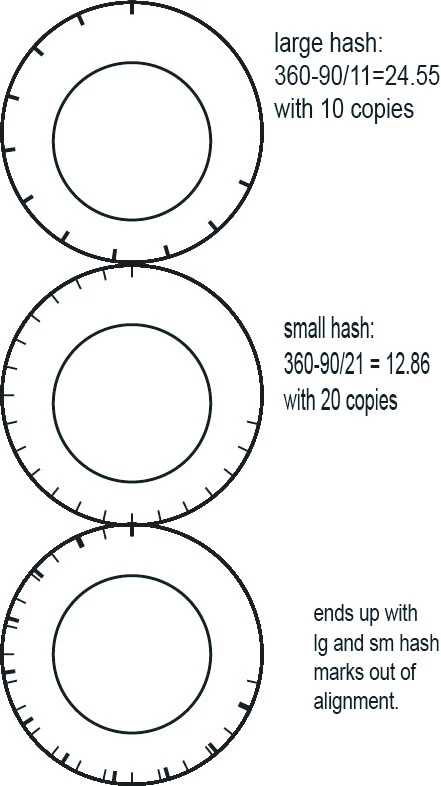
I've gone over the prior discussions because I simply cannot figure out why this particular speedometer's hash marks are not aligning correctly. Here is what I'm doing:(the large hash marks on the speedometer equal 11 and there is a 90 degree gap at the bottom of the speedometer, there are 21 small hash marks).
I create the outer circle, then the inner circle (the inner circle isn't actually needed for the moment);
on a new layer I create the large hash mark;
I select the outer circle and the large hash mark and copy them to another layer
I transform them: 360-90/11 = 24.55 with 10 copies (see top circle)
then, I copy the original outer circle and the original large hash mark to a new layer and adjust the stroke weight to represent the small hash mark
then I transform 360-90/21 = 12.86 with 20 copies (see middle circle)
and you can see my bottom circle that the two sets of hash marks do not align properly. What am I doing wrong?
Thanks,
Jber
 AdChoices