


Mario Arizmendi
Legend
March 31, 2017
Answered

Basic cad tools

  • March 31, 2017
  • 5 replies
  • 18207 views

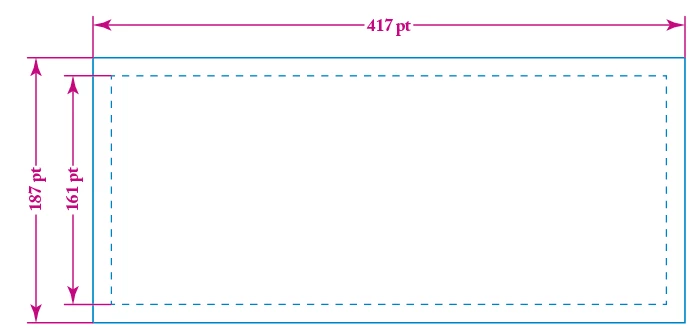
Illustrator needs some basic cad tools for dimentions like this show it he following picture, live, customizable and editable

Pls adobe Team..
This topic has been closed for replies.
Correct answer markr68986399

$350 bucks for Hot Door!  Abobe has a net worth of over $12 billion dollars. I think Adobe could develop and write the script for the plug-in and not see their stock plunge.  Let's get with it Adobe

5 replies

Inspiring
May 8, 2018

Problem of Adobe is not caring about users ideas, needs, adv,ces. There are a few people who give all decisions. I am tired of comparing illustrator vs CorelDraw. But i only want the team analyze CorelDraw and find some new ways to improve illustrator. The interface of illustrator gets more complex year by year. The supported formats are not enough. There are some actions that you have to click and click some hidden tools at bars that you can do same with one click with "other" software. Dimensions, smart guides, "cad-similar tools" are better in corel draw. I like using Adobe. Adobe is much better at whole, but why not to be perfect?

Participant
August 8, 2019

I have used CADtools and liked it but keeping up with the extension update every time Adobe updated just irritated me so after I found the Dimensioning script by Nick Blakey I did not renew it. CADtools does do way more than I am asking it and it is awesome for so much but I only needed it for some dimensioning marks.

The key part of this simple solution is that I was able to modify the script to meet my needs.

I place these script files in this location:

Macintosh HD > Applications > Adobe Illustrator CC 2019 > Presets > en_US > Scripts

I have not been able to locate the original source or any new sources to the original script.

Here is a link to the original by Nick Blakey and my modified versions.

Dimensioning Scripts - Google Drive

There is also another script by Adam Dehaven specify with a panel to control some  of the dimensioning.

https://adamdehaven.com/blog/dimension-adobe-illustrator-designs-with-a-simple-script/

Thanks

Mario Arizmendi
Legend
November 20, 2017

Hmmm Looks like somebody at Adobe team have some interest in this feature, maybe someday they finally came with the tool...

see this

Automatic dimension/measuring tool please – Adobe Illustrator Feedback

Doug Habben
Known Participant
November 19, 2017
Mario Arizmendi
Legend
November 20, 2017

Doug

I really appreciate your plugins I am a user of your Tag72a for very long time and I cant live without it as Illustrator doesn't have this options by itself, by the way, this Tag72a not working with the recent release of illustrator 2018 why? do I need to buy an upgrade? we have a license for 3 computers.

hotdoorsupport
Participating Frequently
June 28, 2017

There is a plug-n available from Hot Door, Inc. called CADtools that has been around for 15 years.

CADtools 10, the latest version, is compatible with Adobe Illustrator CC 2017, CC 2015.3, CC 2015,

CC 2014, CC and CS6.  It adds scaling and dimensioning tools to Illustrator, in addition to many other

tools and features.  You can contact support@hotdoor.com with any questions.  Hot Door offers a free

7-day trial version, as well as a no-questions-asked, 90-day money-back-guarantee for those who need

more time to see if CADtools is the solution they have been looking for!

markr68986399Correct answer
Inspiring
July 31, 2017

$350 bucks for Hot Door!  Abobe has a net worth of over $12 billion dollars. I think Adobe could develop and write the script for the plug-in and not see their stock plunge.  Let's get with it Adobe

Mario Arizmendi
Legend
July 31, 2017

Yes that's the point

I don't wanna pay for an expensive plugin to use only for basic dimensions and then every time the Illustrator app is updated I have to pay again for an upgrade.... No way..!

Any Adobe People here to hear us?

smallprint1976
Known Participant
May 26, 2017

I second this. Dimensioning tool so handy. In sketchup and fusion its amazing.
