
minimumsix9977
Known Participant
October 2, 2018
Answered

Batch .ai to PDF with variables

  • October 2, 2018
  • 5 replies
  • 9203 views

I've scoured the forums on this but have come up dry, at least with an example that mirrors my own frustrations. Link to a post if you find something otherwise. I'll be super explicit in my explanation:

I have an Illustrator file of a release form with variables applied—40 different data sets of names, numbers, addresses, etc. The idea is to export the single .ai into 40 different PDFs with each data set for each person that needs to fill out the form. Easy, right?

I record a "save a copy" action, set it to PDF, choose a new folder, rename the file, finish the "save a copy", click the stop button. Action done.

I select the action and click "batch." It batches the files correctly......but overwrites the PDF every time with a new data set. So I end up with a single PDF that's been overwritten 40 times and, upon the batch's final export, displays the final data set. So I know it's at least batching and pulling data correctly.

For anyone who says "no, do save-as instead," I originally did "save as" but that wouldn't work since the open .ai file would be replaced with the new .pdf file in Illustrator—hence "save a copy" since I wanted the batch to happen from the .ai file.

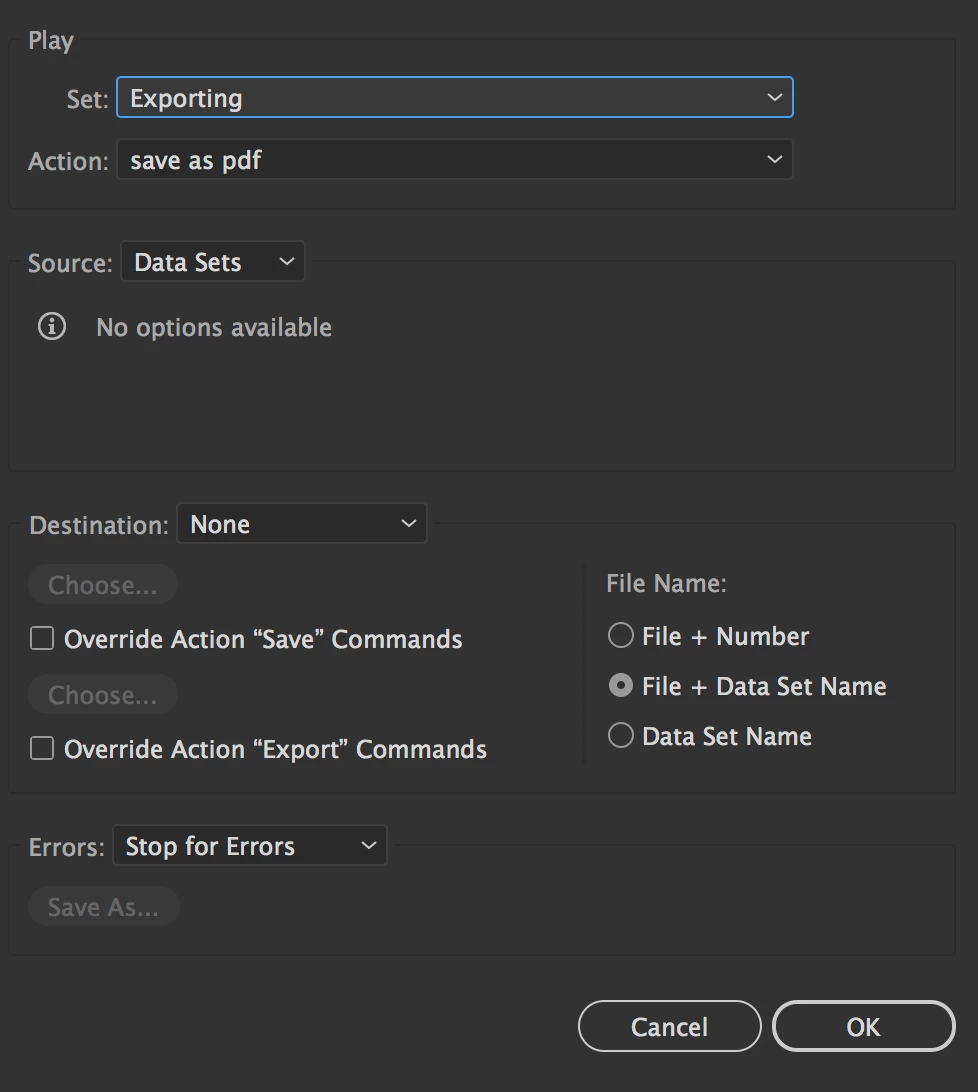
What I don't see is an option to re-name each exported .pdf in order to prevent it from overwriting, which I imagine would be the solution to this. There is something similar in the batch dialogue to the right that says "file name:" and then three options—it doesn't seem to matter which one I choose, the overwrite still happens.
Correct answer Mike Sofa

You are doing it in what appears to be the correct way, but the Batch command is faulty performing this function.

Q3player is right to suggest checking the option "Override Action "Save" Commands. Then choose a destination folder--even if it is the same folder that the Action is already using as it's destination! It will now save separate PDFs without overriding.

Unfortunately, it will also fail to include the ".pdf" in the file names. You will need a renaming utility to restore the file extension.

Hope this helps.

5 replies

Participant
August 23, 2024

Almost 6 years later, I found this thread and it absolutely saved me today. Thanks to all of the past yous who rescued the future me!

Participant
August 27, 2024

This might be one of the craziest things I've ever experienced on the internet. I don't batch variables very often and couldn't remember how to do it. I take to Google. This post was the first search hit, I'm reading it, reading the solutions, see your post about it's been six years and I think "how long has this been a problem?" I scroll up to see when it was originally postead and realize—the post is mine. I'm the OP from 6 years ago when I had a different Adobe work account and WAS HAVING THE SAME DAMN PROBLEM in Illustrator. Unbelivable that Adobe hasn't fixed this. Well, maybe it's not unbelievable. Anyway, thanks "past me" hah!

Inspiring
May 16, 2019

7 months later and the batch command is still not working properly.

To recap:

Not overriding the destination always uses the same name for each data set (record). So, that's no good regardless of filename options.

Overriding the destination will at least serialize the name for each data set. However, the filename options are still a little buggy, adding the artboard name to each filename instance. "File + Number" is mostly correct, but with up-to-two leading zeros and three trailing zeros for the number and also appends the artboard name. "Data Set Name" does use the data set name with a simple number, but also appends the artboard name. And, "File + Data Set Name" combines the original filename, data set name, a simple number, and, again, the artboard name.

How about changing the preset combination choices to checkbox options - oh, in addition to working correctly? Where do I submit suggestions? Ah, nevermind. Nobody cares.

Ton Frederiks
Community Expert
Community Expert
May 16, 2019

davidb17541302  wrote

How about changing the preset combination choices to checkbox options - oh, in addition to working correctly? Where do I submit suggestions? Ah, nevermind. Nobody cares.

You can submit it here:

Adobe Illustrator Feedback

Ton Frederiks
Community Expert
Community Expert
October 2, 2018

There is indeed something wrong with the Batch export and you need to rename the files in Bridge.

See:

Re: Destination options in Illustrator batch menu greyed out

Mike SofaCorrect answer
Inspiring
October 2, 2018

You are doing it in what appears to be the correct way, but the Batch command is faulty performing this function.

Q3player is right to suggest checking the option "Override Action "Save" Commands. Then choose a destination folder--even if it is the same folder that the Action is already using as it's destination! It will now save separate PDFs without overriding.

Unfortunately, it will also fail to include the ".pdf" in the file names. You will need a renaming utility to restore the file extension.

Hope this helps.

minimumsix9977
Known Participant
October 2, 2018

Thanks so much, that did it!

Inspiring
October 2, 2018

You're welcome. Good to know it worked!

Inspiring
October 2, 2018

My first guess would be an error in your action "save as pdf". You could try to check the option "Override Action "Save" Commands". Because as you describe there's no dialog for entering file names when running the batch action. And if there's no iterating number or whatever in your action all files will be saved under the same file name. And that's what you've got.