Inspiring
February 19, 2019
Question

Batch Change Sub Layer Names with Top Layer Names

  • February 19, 2019
  • 1 reply
  • 1288 views

Hello,

I have two questions,

First Question;

In order to export illustrator files to software such as Cinema 4D with correct layer structure and name , there should only be the lowest sub layer (one path) but with the top layer's name. I could not find an exact script to do that. I have 1000 layers like this.
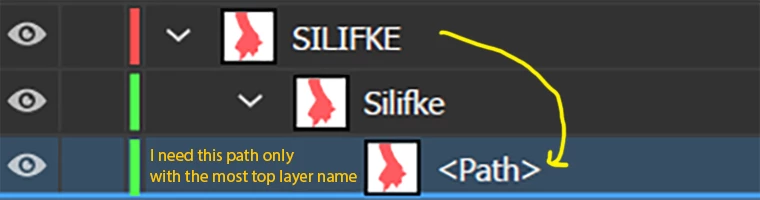
Second Question;I want to copy and paste the names of top layers for all layers.
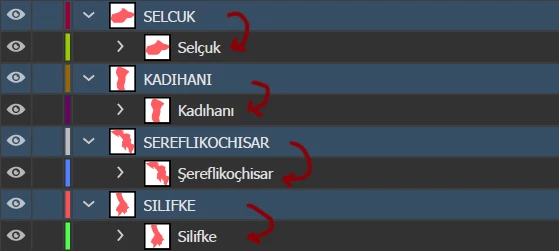
Please help, I could not find an exact script to do that.

Thank you,

Best Regards.

This topic has been closed for replies.

1 reply

Silly-V
Legend
February 19, 2019

Try this and see if it works:

#target illustrator

function test(){

  var doc = app.activeDocument;

  var topLayers = doc.layers;

  var thisTopLayer, thisSubLayer, thisPath;

  for (var i = 0; i < topLayers.length; i++) {

    thisTopLayer = topLayers[i];

    thisSubLayer = thisTopLayer.layers[0];

    thisPath = thisSubLayer.pathItems[0];

    thisPath.name = thisTopLayer.name;

  }

}

test();

Inspiring
February 19, 2019

Thanks a lot for the quick reply, it throws an error on this line. Also is it possible to extract lowest path to a new layer and delete empty like in my first question.

Silly-V
Legend
February 20, 2019

I looks like your structure is like this from the screenshot:

Top Layer > Sub-Layer > Path

Could one of your layers have this structure?

Top Layer > Group > Path