Inspiring
February 19, 2017
Answered

Batch Rename Everything

  • February 19, 2017
  • 1 reply
  • 1989 views

Hello, I want to batch rename everything.

What I want to do is similar to this script:

GitHub - shspage/illustrator-scripts: JavaScript scripts for Adobe Illustrator CSx.
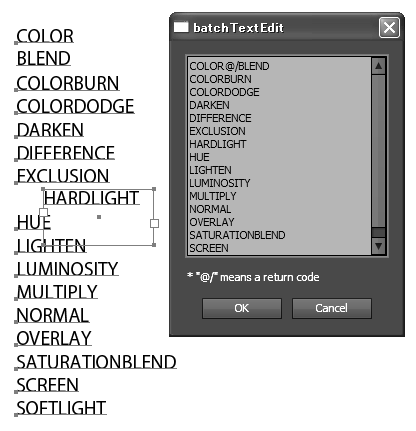
This script collects every textframe to a pop-up window and let you modify the text and replace it.

What I want to do is you run a script in a document, open a pop-up window, and it contains the document's tree.

Something like this:

  • Layer 1
  • Layer 2
    • PathItem 1
    • PathItem 2
    • GroupItem 1
      • PathItem 3
      • PathItem 4
    • PathItem 5
  • Layer 3

And you can modify them like this:

layer 1

mainLayer

--rect

--circle

--mainGroup

----icon 1

----icon 2

--stuff

lastLayer

Here is some code I go so far:

(function() {

  var allLayersName = "";  //store document's tree

  var level = 0;  //store item's order

  for (var i = 0; i < app.activeDocument.layers.length; i++) {  //loop throught all top layers

    loopThroughAllItems(app.activeDocument.layers, level);  //go into layers, this is a recursive function

  }

  alert(allLayersName); //display document's tree

  function loopThroughAllItems(elem, level) {

    if(elem.typename == "GroupItem" || elem.typename == "Layer") {

      allLayersName += Array(level).join("--") + elem.name + "\n";  //Array(level).join("--") means repeat "--" string level times, level = 2 you get "----"

      level++;

      for (var i = 0; i < elem.length; i++) {  //this line is where I stuck because illustrator doesn't have this kind of api

        return loopThroughAllItems(elem.index(i), level);  //I think this line is also not gonna work XDD

      }

    } else {

      if(elem.parent.index(elem.pareent.length-1) == elem) {  //detect if it is last element inside a group or layer

        allLayersName += "--".repeat(level) + elem.name + "\n";

        level--;  //decrease level so you get proper order

      } else {

        allLayersName += "--".repeat(level) + elem.name + "\n";  //there is still some items inside the group or layer

      }

    }

  }})();

I stuck at line 12, 13 because illustrator doesn't have that api.

I don't know how to get a groupItem or layer's child in proper order.

Please Help~

This topic has been closed for replies.
Correct answer o-marat

Hello, JosephWang​!

You want to completely duplicate the Layers palette in the script window. Get access to change the names of objects.

And what you do not like Layers palette itself? Why it can not be done in a palette Layers?

Which functions do you miss in the Layers palette?

New

In my opinion here you have at least two problems:

  1. to build the object tree of the document
  2. keep the feedback of the tree  elements  with the corresponding element of the document to edit the name of the object
  3. something else?

New New  Updated

About errors on line 12, 13 in your code:

GroupItem and Layer objects does not have length property,

but GroupItem may contain PageItems object (that may contain some kind of PageItem objects)

and Layer may contain Layers and PageItems objects.

So if (elem.typename == 'Layer')

then you must operate with elem.layers and elem.pageItems objects

and it means that elem.layres.length and elem.pageItems.length are exists...

1 reply

o-marat
o-maratCorrect answer
Inspiring
February 19, 2017

Hello, JosephWang​!

You want to completely duplicate the Layers palette in the script window. Get access to change the names of objects.

And what you do not like Layers palette itself? Why it can not be done in a palette Layers?

Which functions do you miss in the Layers palette?

New

In my opinion here you have at least two problems:

  1. to build the object tree of the document
  2. keep the feedback of the tree  elements  with the corresponding element of the document to edit the name of the object
  3. something else?

New New  Updated

About errors on line 12, 13 in your code:

GroupItem and Layer objects does not have length property,

but GroupItem may contain PageItems object (that may contain some kind of PageItem objects)

and Layer may contain Layers and PageItems objects.

So if (elem.typename == 'Layer')

then you must operate with elem.layers and elem.pageItems objects

and it means that elem.layres.length and elem.pageItems.length are exists...

Inspiring
February 19, 2017

I think I found solutions in your answer. Thanks a lot!