Cymoril
Participating Frequently
June 20, 2018
Answered

Beginner question on rotation for symmetrical work

  • June 20, 2018
  • 1 reply
  • 375 views

Hi there!

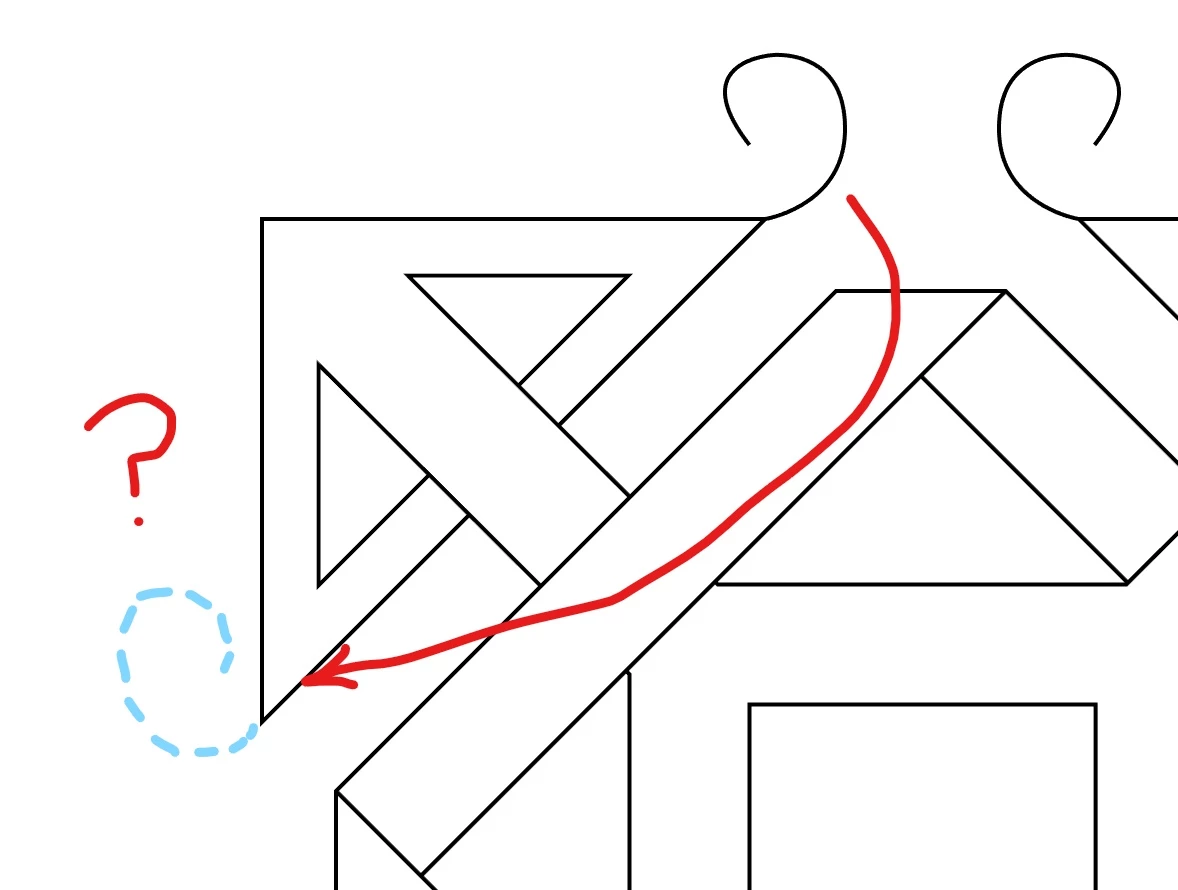
In the picture below I have drawn what I try to achieve, marked in blue dashes. I need to move the little spiral in the top to the indicated position. But I can't figure out on how to make that position exactly symmetrical to the top spiral's. I've been playing around with reflect and rotate but it doesn't work.

Do I have do have an exact angle and how can I measure it?
This topic has been closed for replies.
Correct answer Monika Gause

Select the object you want to mirror

Select the mirror tool.

Press the Alt key (for copying)

With the tool click on one point of the axis and drag to another point on the axis.

Works better when Smart guides is utrned on.

Please do read the documentation on how to use the transform tools.

1 reply

Monika Gause
Community Expert
Community Expert
June 20, 2018

Cymoril
CymorilAuthor
Participating Frequently
June 21, 2018

That's smart. Is there some way I can set this paeticular rotational/mirror axis (or any other that I want) in the reflect or rotate dialogue? An explanation on how to apply your tip would be great.

Monika Gause
Community Expert
Monika GauseCommunity ExpertCorrect answer
Community Expert
June 21, 2018

Select the object you want to mirror

Select the mirror tool.

Press the Alt key (for copying)

With the tool click on one point of the axis and drag to another point on the axis.

Works better when Smart guides is utrned on.

Please do read the documentation on how to use the transform tools.