
douglasp69616965
Participant
August 23, 2017
Question

Best way to effect the logo

  • August 23, 2017
  • 3 replies
  • 343 views

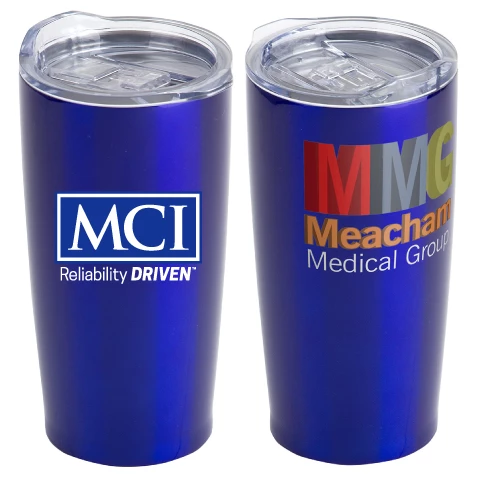
Not sure which effect to use to apply a logo to the front of a tumbler/glass.

Is there a quick way to accomplish this such that the logo appears to wrap around the sides of the tumbler.

The tumbler image on the right is manufacturer provided image showing a logo on it. The tumbler on the left is a blank tumbler

with my MCI logo I am trying to give the same effect as on the right.
    This topic has been closed for replies.

    3 replies

    Mike_Gondek10189183
    Community Expert
    Community Expert
    August 23, 2017

    Effect >> Warp >> Arc

    For a placed image you need to embed first in the links fly out menu, but I have a feeling your MCI logo is vector by the sharpness of the screenhshot, but just  letting you know incase.

    Jacob Bugge
    Community Expert
    Community Expert
    August 23, 2017

    Douglas,

    It is always best to keep one question in one thread, to get all the advice in one place and avoid duplicates.

    Best way to apply logo to drink tumbler

    douglasp69616965
    Participant
    August 23, 2017

    Note I do not need the drop shadow effect on my MCI logo, just want to show it curving around the face of tumbler as it look if already imprinted on the item.

    Monika Gause
    Community Expert
    Community Expert
    August 23, 2017

    Make a dummy object.

    Draw the silhouette of the tumbler, apply the 3D revolve effect and then apply the logo to it as artwork.

    In th effect options you can then hide geometry so you have only the distorted logo left.

    How to create 3D objects in Illustrator