best way to make chain graphic with gradient fill (gold)
I am trying to make a chain necklace in illustrator and I am a beginner with AI. So far I have learned how to make the chain links themselves and save them as a pattern brush. However, I want to be able to fill these links with a gold tone gradient (which I have). Ideally I would like the rings and the links to have independent gradients to make them look more realistic:

But i have not figured out how to do this since you can't put a gradient into a pattern brush...
I am ok with a more flat look like below but the links between have the seam where the gradients end. I have tried playing with the gradient to no avail. And i understand why the seam is there as my pattern begins and ends in the middle of the middle link. But is there any way to fix this and apply the gradient more easily?
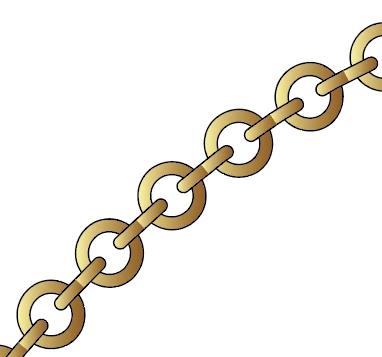
OR is there a better way to make a chain with gold gradient fill?
 AdChoices