
Participant
May 28, 2024
Question

Betreff: Illustrator Plug-in

  • May 28, 2024
  • 2 replies
  • 395 views

Bonjour,

Moi j'ai le même problème,

j'ai le message ci joint en conseil de depannage mais je n'arrive pas bien à suivre le schéma et je tourne en boucle.
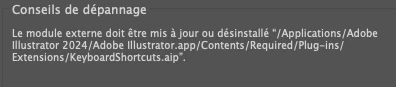
Quelqu'un aurait une solution ou une chemin à suivre? Merci beaucoup d'avance

[ branched from https://community.adobe.com/t5/illustrator-discussions/illustrator-plug-in/td-p/12949960  to Illustrator forum by moderator ]


    This topic has been closed for replies.

    2 replies

    Anubhav M
    Community Manager
    Community Manager
    May 29, 2024

    Hello @florc99929198,

    We understand that technical issues can be frustrating. Would you mind trying the suggestions in this help article (https://adobe.ly/458Ifow) and letting us know if they help?


    Looking forward to hearing from you.


    Thanks,

    Anubhav

    pixxxelschubser
    Community Expert
    Community Expert
    May 28, 2024

    No. This is not the same problem. 


    Unfortunately, I don't speak French and we can't translate an error message in a screenshot in the forum. 


    But since it is the KeyboardShortcuts.aip - could it be that Illustrator needs this file but can't find it?

    Anubhav M
    Community Manager
    Community Manager
    May 28, 2024

    Hello @florc99929198,

    We understand that encountering technical issues can be frustrating. Would you mind trying the suggestions shared in this help article (https://adobe.ly/4524RXF) and letting us know if it helps?


    Looking forward to hearing from you.


    Thanks,

    Anubhav

    Participant
    May 28, 2024
    Hello,
    Thank you very much for your answer.

    I'm using MacBOOK PRO 16Go
    MacOS Sonoma 14.4.1

    After upgrading, basic keyboard shortcuts (e.g. delete/Command Z./save/etc ) cannot be used.


    By following the help schema i efectively came across this link ( (https://adobe.ly/4524RXF)
    i find problems difficult to overcome for me non connoisseur of computer basics :

    I don't know Update external plug-ins to their latest version.
    I also don't know where the illustrator preferences file is, so I'll have to delete it and recreate another one.


    the message that appears is:


    Image translation :
    External module : Keyboard...deactivated

    Troubleshooting tip
    The plug-in must be updated or uninstalled “/Applications/Adobe Illustrator 2024/Adobe Illustrator.app/Contents/Requiered/Plug-ins Extensions/KeyboardShortcuts.aip”.