Question
Better [TAB] order in Print menu
I know this seems like such a small request, but for someone that prints several screen separations a day it would be extremely helpful.
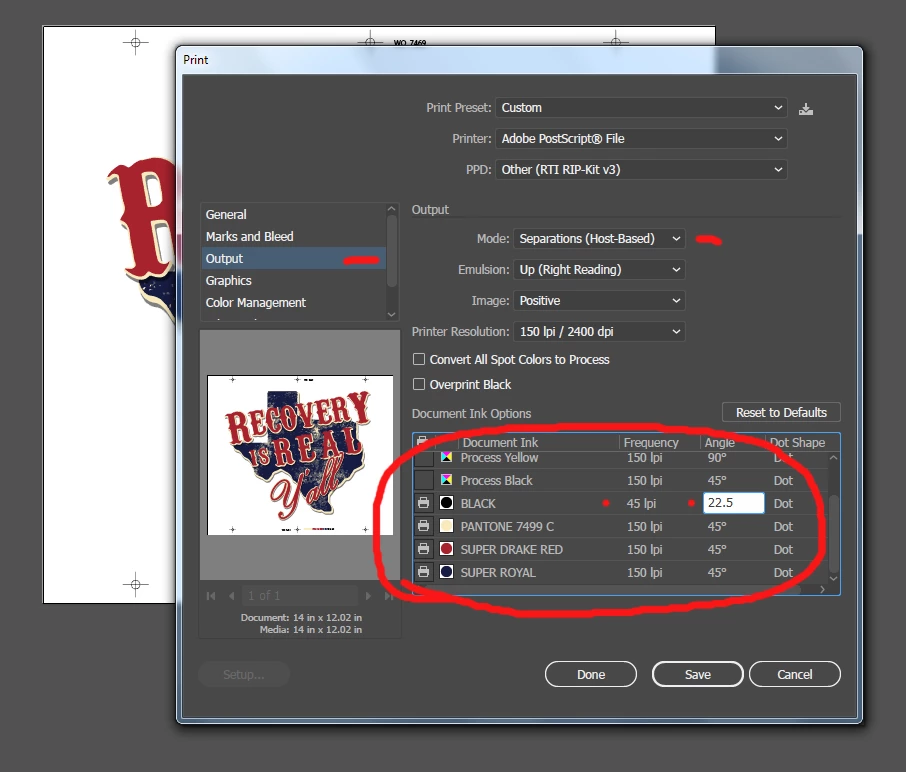
When you go to "Print" and go to the OUTPUT section and choose SEPARATIONS - There you can choose the Frequency / Angle / and Dot Shape.
Can you make it where when the FREQUENCY has "Focus" (highlighted), when you press [TAB], it would then send focus to the ANGLE, then to the DOT SHAPE. then to the next Document color to enter those amounts.
Now you have to use a mouse and select each value to change it... Like I said, seems small, but when you do 20 - 30 per day, with 4-8 colors each, it gets REALLY tedious, when a simple "Tab Order" in the programing would fix that.
 AdChoices