Inspiring
October 29, 2022
Question

bezier tools

  • October 29, 2022
  • 2 replies
  • 1097 views

Hello


is it possible to import from photoshop to illustrator a bezier image with the : layer effects ?


Is there a curve blend in illustrator?
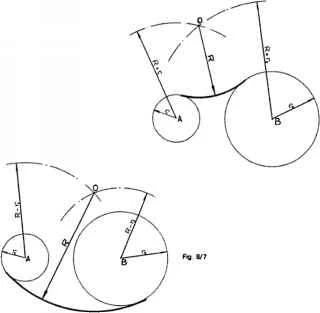


are there more bezier tools in illustrator similar to RHINOCEROS tools?
like : offset , fillet , a well - evolved snap system , etc ?
could be plugin


thanks

This topic has been closed for replies.

2 replies

Anna Lander
Inspiring
November 5, 2022

Your images look like a raster sketch, not a bezier image. Did you draw them with vector tools in Photoshop? If not, you just need to import the image in Illustrator as a reference and draw vectors using Illustrator's tools.

If you've drawn the shapes in Photoshop, you can export them as Paths to Illustrator and then add all needed attributes. No, export does not keep the effects due to different technical principles of Photoshop and Illustrator.

You can add and combine effects and overlays using the Appearance panel as Monica suggested. You can consider it as some analog of the Photoshop layer effects.

Yes, Illustrator works fine with Bezier splines. Yes, there is the Blend tool there. Yes, there are some different options for snapping, and you can adjust it as you need. Yes, there are some Photoshop effects which you can add to your object. But, just like in Photoshop, they will not create real 3d (as you talk about RHINOCEROS, you need finally some 3D object, yes?)
For 3D you need to use the 3D and Materials panel. There you will find all usual options such as fillets, offset etc., and then you can export the 3d object in the needed exchanging format to open it in the needed 3DD soft.

Monika Gause
Community Expert
Community Expert
October 29, 2022

Layer effects will not be editable in Illustrator. With some of them the vector paths might still be there, others not so much.


As for the other tools: Yes, maybe. If you would care to explain what they do.

Inspiring
October 29, 2022

as for snap: a plugin that has more snap features and tools. exists ?

as for bezier: a plugin that adds more features for drawing. exists ?

thanks

Monika Gause
Community Expert
Community Expert
October 29, 2022

Snap: Have you tried Smart guides?


For drawing there are 3 plugins:

VectorScribe and PathScribe

Xtream Path

CADtools

then you could take a look at Rick Johnson's plugins for specific needs: rj-graffix.com


There are also gazillions of scripts

But maybe you'd want to explain in detail what you need.