
Participant
November 27, 2017
Answered

Black Lines Overlapping

  • November 27, 2017
  • 4 replies
  • 1338 views

Hello,

I'm not sure what is causing this issue, but I have overlapping black lines on my shapes. It appears that there are black borders around every shape in addition to the stroke. I'm using a 2pt black stroke, but regardless of the stroke size and color (or even if I remove the stroke) there is a black border surrounding each shape. What's worse is this black border does not care about the arrangement of the image.
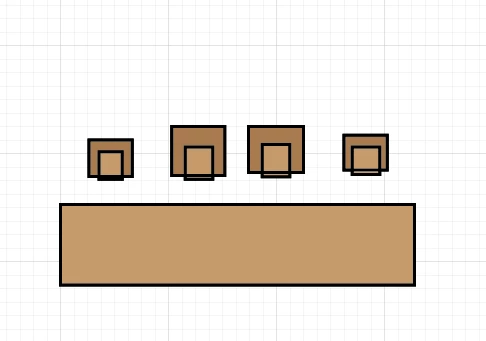
In the above image, the lighter brown squares are on top of the darker brown squares. I do not want the lines overlapping. The black line intersecting the bottom of the light brown squares should not be visible because the dark brown squares are underneath (or behind) the light brown squares.

These squares do have a 2pt black stroke, however, what you are seeing is not the stroke; when I remove, resize, or recolor the stroke those black lines remain unaffected.

I am using Adobe Illustrator 22.0.1.

    This topic has been closed for replies.
    Correct answer Doug A Roberts

    is there a stroke applied to the layer (select an object, open the appearance panel and click on 'layer')?

    4 replies

    Kris Hunt
    Legend
    November 27, 2017

    The good news is that this is a feature, not a bug, and you're just doing it wrong.

    Michael Riordan
    Inspiring
    November 27, 2017

    can you provide a screen capture of your Appearance panel and your layers panel?

    \

    Michael Riordan
    Inspiring
    November 27, 2017

    That’s what I was thinking it might be.

    Doug A Roberts
    Community Expert
    Doug A RobertsCommunity ExpertCorrect answer
    Community Expert
    November 27, 2017

    is there a stroke applied to the layer (select an object, open the appearance panel and click on 'layer')?

    Participant
    November 27, 2017

    Yes, somehow I added a stroke to the layer itself, giving every object in the layer its own stroke. I've fixed it, thanks!

    Kris Hunt
    Legend
    November 27, 2017

    How many strokes do you see in your Appearance palette when the shape/group is selected?