Participant
August 13, 2019
Question

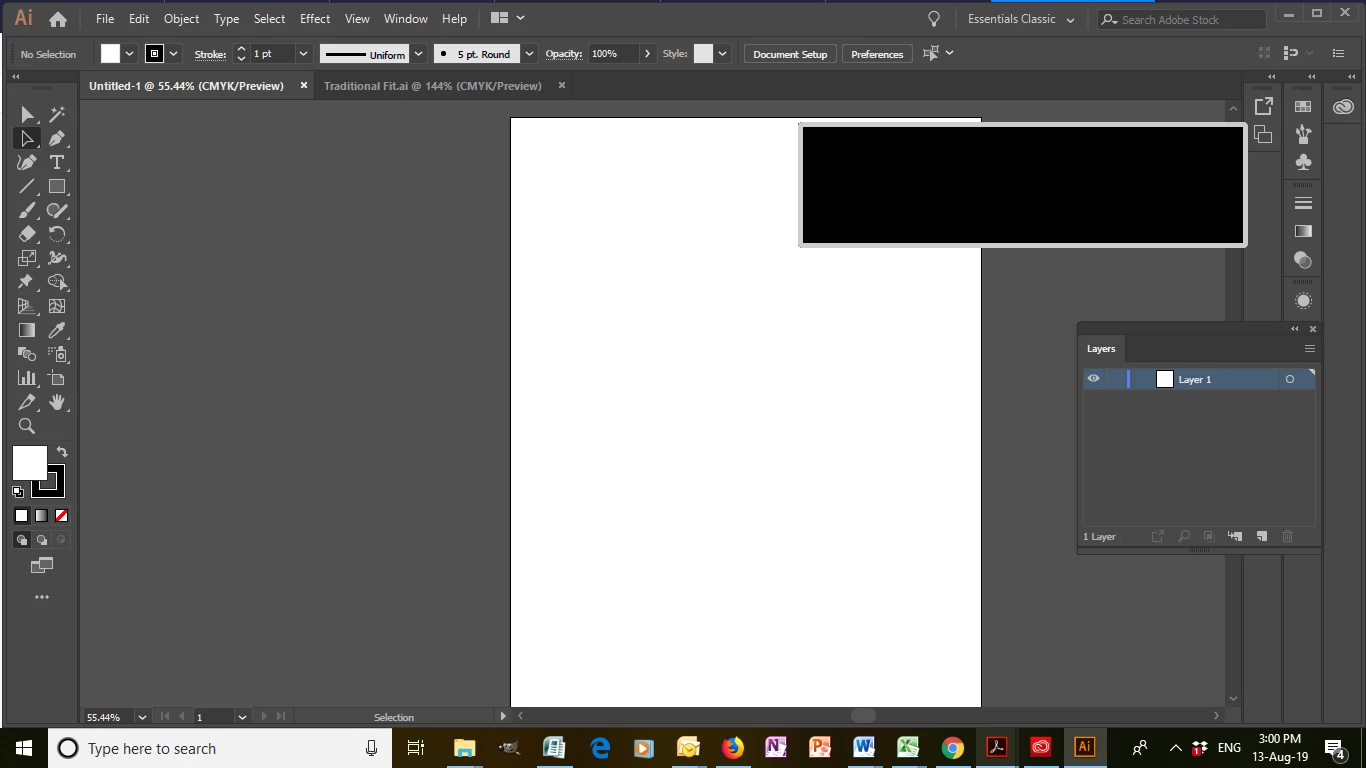
Black rectangle is appearing after installing recent update of 2019 on Windows 10

  • August 13, 2019
  • 2 replies
  • 441 views

I cannot delete or move the black rectangle that is always showing now after I updated Illustrator a few days ago.

Any ideas?

thanks Narelle
{Renamed by MOD}

    This topic has been closed for replies.

    2 replies

    Srishti Bali
    Community Manager
    Community Manager
    August 21, 2019

    Hi Narelle,

    Thanks for reaching out. I understand that you are talking about this black rectangle on the top right corner of the screen.  In addition to information asked by Italo, I would request if you can share a few more details like:

    • Which graphic card is installed on your system and when it was updated last time?
    • Did you try resetting preferences for Illustrator? If not, please try the steps shared here: How to set preferences in Illustrator

    Please note that resetting preferences will remove all the custom settings and Illustrator will launch with default settings. You can also take a backup of the folders in case you want to. Location is mentioned in the article.

    Please update the discussion if the issue is resolved or if you have any further queries.

    Regards,

    Srishti

    italosan
    Community Expert
    Community Expert
    August 13, 2019

    Hi, could you list the technical specifications of your computer? Have you checked if there are any driver updates for the graphics card?
