
Participant
April 19, 2022
Answered

black SVG on the internet

  • April 19, 2022
  • 2 replies
  • 892 views

Hi, 

On our website, we use SVGs that are exported from Illustrator. When we use them on some pages, it works. 

ex: https://bib.umontreal.ca/communications/nouvelles/nouvelle/studio-enregistrement-lsh

But if we want to see only the image from the repertory, it is all turning black : https://bib.umontreal.ca/public/bib/images-dg/promotions/studio-enregistrement.svg 


Is there a problem with the way we export our SVGs?


Thanks, 

L-A
This topic has been closed for replies.
Correct answer Anubhav M

Hello @lagignacUdeM,


Sorry to hear about this experience. I agree with @thatsmauri. It seems to be an issue with "Content Security Policy" settings of the server where the SVG file is hosted. You need to contact your hosting provider.


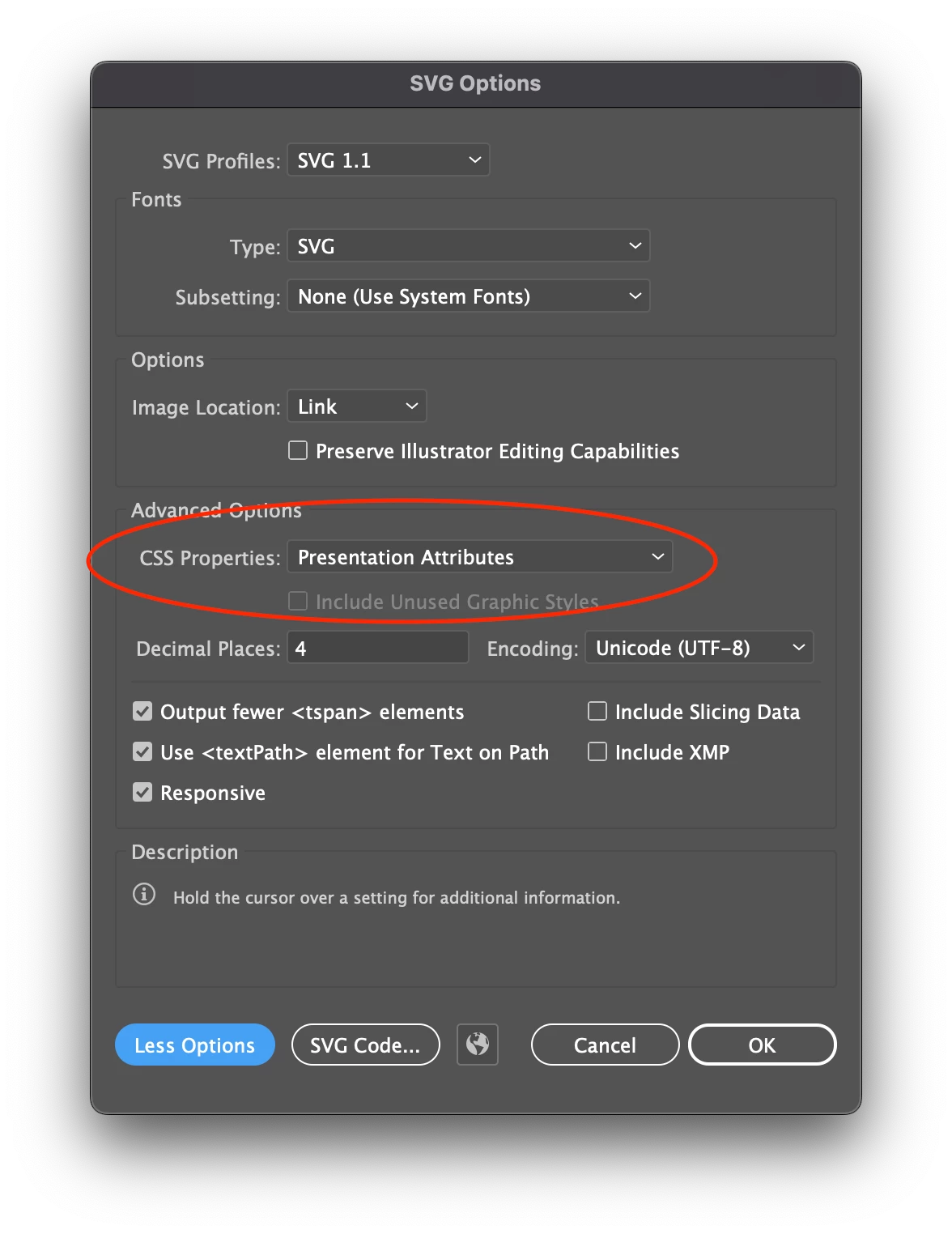
This is not an issue with the SVG file itself. A workaround would be to generate the SVG file as follows:

  1. File > Save As (SVG)
  2. In the SVG Options dialog that opens up press the button "More Options"
  3. Change the dop-down menu "CSS Properties" to "Presentation Attributes"


I hope it helps.


Thanks,

Anubhav


2 replies

Anubhav M
Community Manager
Anubhav MCommunity ManagerCorrect answer
Community Manager
April 25, 2022

Hello @lagignacUdeM,


Sorry to hear about this experience. I agree with @thatsmauri. It seems to be an issue with "Content Security Policy" settings of the server where the SVG file is hosted. You need to contact your hosting provider.


This is not an issue with the SVG file itself. A workaround would be to generate the SVG file as follows:

  1. File > Save As (SVG)
  2. In the SVG Options dialog that opens up press the button "More Options"
  3. Change the dop-down menu "CSS Properties" to "Presentation Attributes"


I hope it helps.


Thanks,

Anubhav


Participant
April 27, 2022

Hi, 

Yes, it works! 

Thanks!

Laurie-Anne

thatsmauri
Community Expert
Community Expert
April 24, 2022

There seems to be some sort of security violation going on.


I've downloaded your SVG, opened it up in my browser and it rendered correctly. When I open your .svg link and check the browser's console, it shows me these two errors:

  • Refused to apply inline style because it violates the following Content Security Policy directive: "style-src 'none'". Either the 'unsafe-inline' keyword, a hash ('<redacted because I don't know if it's safe to post here>'), or a nonce ('nonce-...') is required to enable inline execution. Note that hashes do not apply to event handlers, style attributes and javascript&colon; navigations unless the 'unsafe-hashes' keyword is present. | studio-enregistrement.svg:4 
  • Refused to apply inline style because it violates the following Content Security Policy directive: "style-src 'none'". Either the 'unsafe-inline' keyword, a hash ('<redacted because I don't know if it's safe to post here>'), or a nonce ('nonce-...') is required to enable inline execution. | studio-enregistrement.svg:5


To learn more about Content Security Policy, visit the site below:


Below is an example .htaccess file - please do not just use it "as-is" if you're not sure about this: