barbarao89333980
Participant
May 1, 2018
Answered

blanco y negro

  • May 1, 2018
  • 2 replies
  • 27395 views

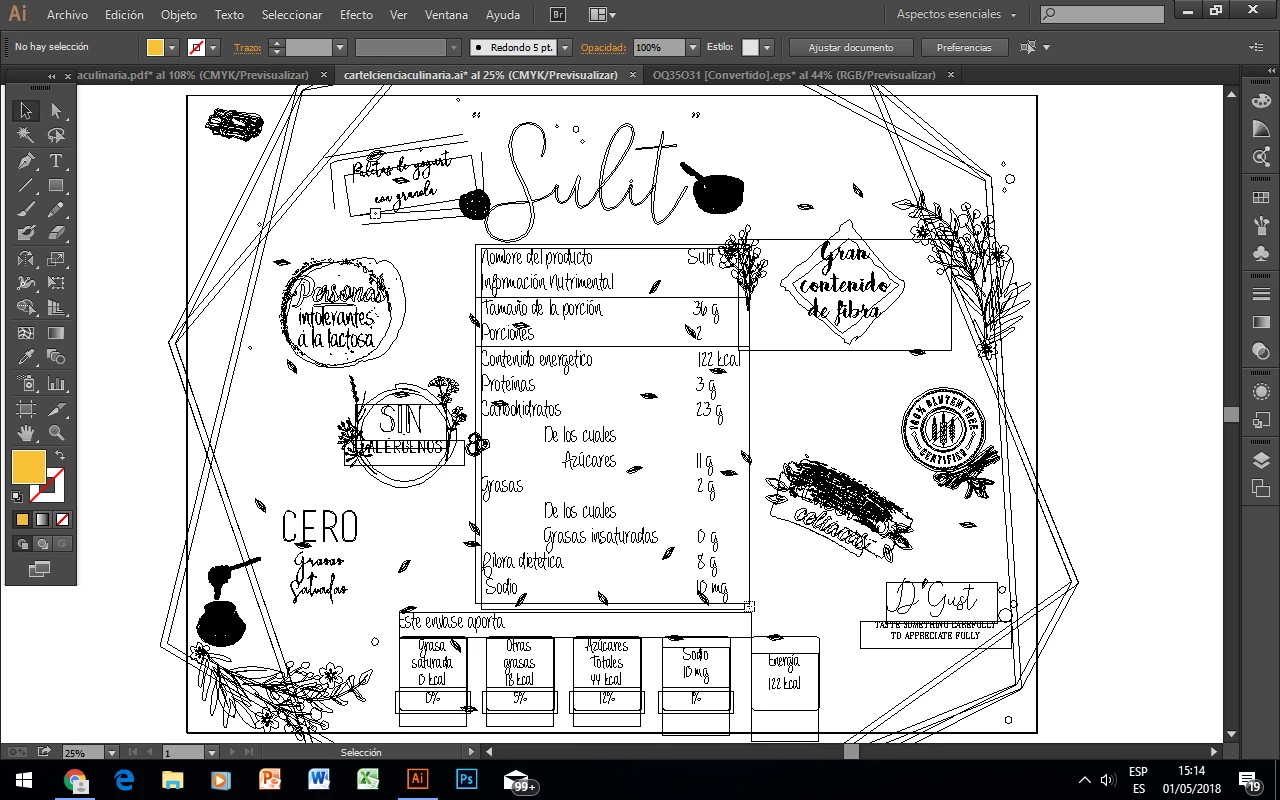
¿Cómo puedo quitar el blanco y negro de la pantalla? De repente se volvió en ese color y ya no se como volver al original

    This topic has been closed for replies.
    Correct answer John Mensinger

    You are in View > Outline mode.

    Choose View > Preview...

    Ctrl+Y switches back and forth

    2 replies

    carlosgarro
    Community Expert
    Community Expert
    May 1, 2018

    John está en lo correcto.

    En este vínculo podés ver todas las opciones que existen para visualizar contenido en Illustrator: Visualización de ilustraciones en Illustrator

    Saludos Cordiales

    Ton Frederiks
    Community Expert
    Community Expert
    May 1, 2018

    But does the screendump not indicate that he is in Preview mode (Previsualizar)?

    Seleccione Ver > Previsualizar para volver a previsualizar la ilustración en color.

    John Mensinger
    Community Expert
    John MensingerCommunity ExpertCorrect answer
    Community Expert
    May 1, 2018

    You are in View > Outline mode.

    Choose View > Preview...

    Ctrl+Y switches back and forth