

Answered
Blank column in actions panel
Is this happening to anyone else? Suddenly my actions panel shows an extra, blank column that's cutting off my action names/steps and can't be moved or resized.
Illustrator 2023 v27.0
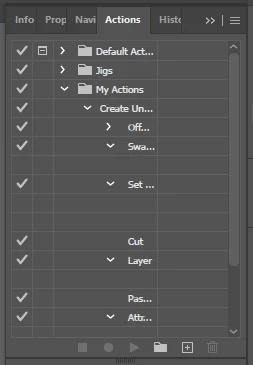

Is this happening to anyone else? Suddenly my actions panel shows an extra, blank column that's cutting off my action names/steps and can't be moved or resized.
Illustrator 2023 v27.0
Already have an account? Login
Enter your E-mail address. We'll send you an e-mail with instructions to reset your password.

 AdChoices