
Blank fonts in Illustrator Character panel
After updating Illustrator on Windows 10 from 27.9 to 28.1, two of my critical project fonts have gone blank in the Character window after years of working fine. Illustrator's canvas shows them as empty text fields even though the fonts are still visible and functional in Photoshop, Premiere, After Effects and XD. 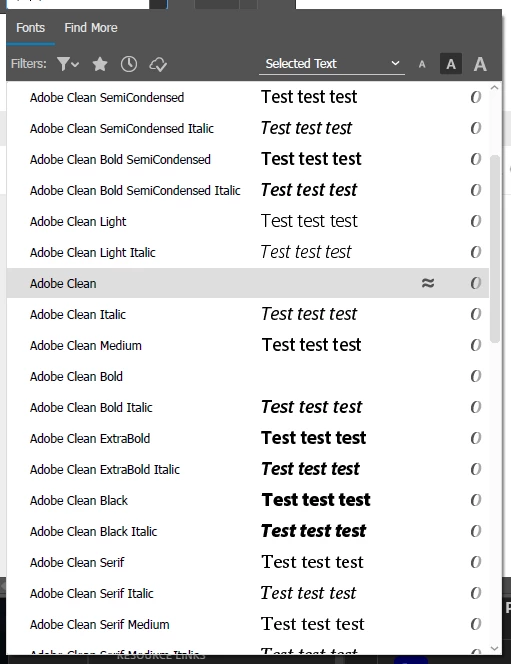
The fonts still work on my secondary office PC also running Windows 10 and were not affected by the app updates. I'm not running any 3rd party font management software on either system.
So far, I've:
- closed all Adobe apps and uninstalled/reinstalled the fonts via Control Panel and Registry Editor with reboots in between
- stopped/disabled Windows Font Cache Service and Windows Presentation Foundation Font Cache 3.0.0.0 and deleted the contents of: C:\Windows\ServiceProfiles\LocalService\AppData\Local\FontCache followed by rebooting
- Reset Preferences in Illustrator's Edit > Preferences > General settings
- uninstalled/reinstalled Illustrator followed by another font cache clear, reboot and font reinstallation.
- rolled back Illustrator to version 27.9 and then repeating the font cache clear/font reinstallation steps
I haven't tried a clean reinstall of the Adobe Suite yet or a new/clean Windows installation but I would like to avoid needing to start from scratch. Is there an Illustrator specific cache that can be cleared or a different installation method or order of operations I should try?
Thanks in advance for any advice!


 AdChoices