
Blend Tool Not Making Smooth Color Blend
I'm using Illustrator CC (on a Win7 Pro machine) at a beginner level, probably halfway to intermediate. I'm trying to learn how to blend colors together for highlights of various types (skin tones, clothing, light on objects, etc.) so that when I'm making a graphic for a project I'll have a decent idea of which tool/technique is best for the specific effect I need.
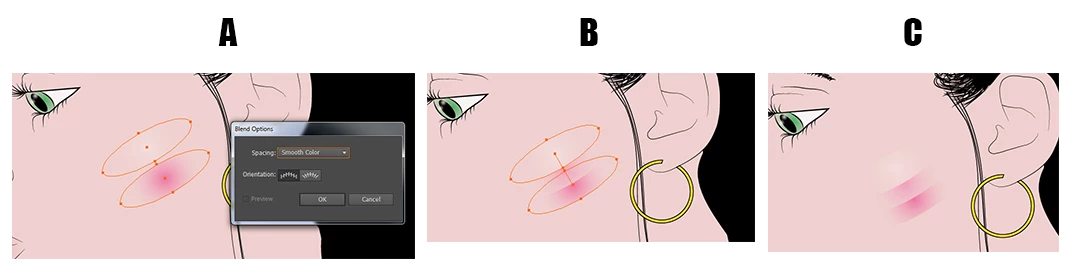
I'm trying to use the Smooth Color option in the blend tool. Late yesterday afternoon I recall creating two ellipses (one of which was a solid fill and one of which was a gradient going from black to transparent) and getting a smooth color transition between the two. It was a much harsher effect than I was looking for so I didn't keep it. This morning, while trying to replicate the same thing, I seem to be unable to use smooth color between two objects if one or more of them has a gradient applied. I only get what you see below, which is a step between the two objects.
I've done searches and found multiple references to blending gradients in this way and have followed those instructions (create the shapes, fill with the gradients, then either click on the Blend tool and click on the center of each shape, or click on Object -> Blend -> Make) but I can't seem to get a Smooth Color blend if either object has a gradient applied. Am I missing an important step somewhere? I'm 95% sure I accomplished it yesterday and nothing has been changed since then.
I realize the blend tool might not be the best option in this particular instance but this is just a learning exercise for me. I could as easily have chosen a metal or plastic object (and I'm sure I will do some of each to practice) but I would probably still be here asking the same question.


 AdChoices