Participant
November 18, 2022
Answered

Blocage des préférences

  • November 18, 2022
  • 3 replies
  • 598 views

Bonjour,

il m'est impossible de modifier les données dans "préférences", la fenêtre n'apparaissant que partiellement.

Si quelqu'un à une solution je suis preneuse.

Merci.

This topic has been closed for replies.
Correct answer Anubhav M

Hello @NICOLAS23885630msgi,


Would you mind trying the following steps and see if that helps:
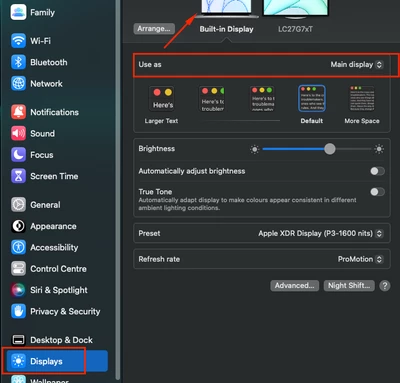
  • Set your Macbook Pro as Main display in System Preferences > Dsipalys > Select "Built-in Display" > "Use as Main Display"


  • Move the preferences dialog to Macbook Pro Screen, then close it. Reopen the preferences dialog again, and it should get enlarged.


Let us know how it goes. We'd be looking forward to your response.


Regards

3 replies

Anubhav M
Community Manager
Anubhav MCommunity ManagerCorrect answer
Community Manager
December 2, 2022

Hello @NICOLAS23885630msgi,


Would you mind trying the following steps and see if that helps:

  • Set your Macbook Pro as Main display in System Preferences > Dsipalys > Select "Built-in Display" > "Use as Main Display"


  • Move the preferences dialog to Macbook Pro Screen, then close it. Reopen the preferences dialog again, and it should get enlarged.


Let us know how it goes. We'd be looking forward to your response.


Regards

Anubhav M
Community Manager
Community Manager
November 18, 2022

Hello @NICOLAS23885630msgi,


Sorry to hear about this experience. I hope the suggestions shared by Kevin helped resolve the problem. If not, kindly try using the Creative Cloud Cleaner Tool (https://helpx.adobe.com/creative-cloud/kb/cc-cleaner-tool-installation-problems.html) to remove Illustrator and reinstall using the Creative Cloud Desktop app to check if it helps.


Looking forward to your response.


Thanks,

Anubhav

Kevin Stohlmeyer
Community Expert
Community Expert
November 18, 2022
