



Inspiring
October 8, 2025
Question

Blurry app icon on PC?

  • October 8, 2025
  • 1 reply
  • 89 views

I have been able to successfully create clear app icons on macOS by including the following in my manifest.xml:

<Icon Type="Normal"      >./png/panel_icon_light24.png</Icon>
<Icon Type="RollOver"    >./png/panel_icon_light24.png</Icon>
<Icon Type="DarkNormal"  >./png/panel_icon_dark24.png</Icon>
<Icon Type="DarkRollover">./png/panel_icon_dark24.png</Icon>

and having alternate versions called

  • panel_icon_light24.png

  • panel_icon_dark24@2X.png


Everything looks great on Mac, but on PC the icon is extremely blurry compared to the Adobe stock icons:
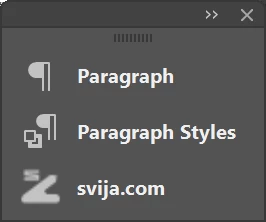
 

I have successfully solved this problem in the past by using SVG files for the icons, but the last time I submitted my panel, Adobe refused to accept the app until I put back the PNG files.


Does anybody know how to get sharp-looking app icons on PC?

1 reply

creative explorer
Community Expert
Community Expert
October 20, 2025

@Andy Swift Windows handles DPI scaling differently than macOS, often requiring higher-resolution assets to look crisp. To get sharp-looking app icons on Windows in Illustrator panels, you need to ensure your PNG assets are exported at the correct resolution and scaling for Windows rendering, especially for high-DPI displays. SVGs may look sharper, but Adobe requires PNGs for submission, so optimizing PNG output is key. Try exporting your PNGs at 2x or 3x the resolution. Ensure Art Optimized (Supersampling) is selected. Also make sure your icons are sized to whole pixel values (e.g., 24x24, 48x48, 96x96). In Illustrator, enable Align to Pixel Grid under Transform panel. This ensures strokes and edges snap cleanly, reducing blur. And don't use Transparency, just crop tightly and use solid backgrounds if needed.

m