



Krevkinko
Participant
February 17, 2026
Answered

Borders keep showing up in my repeating pattern I'm making. I need help removing them!

  • February 17, 2026
  • 2 replies
  • 31 views

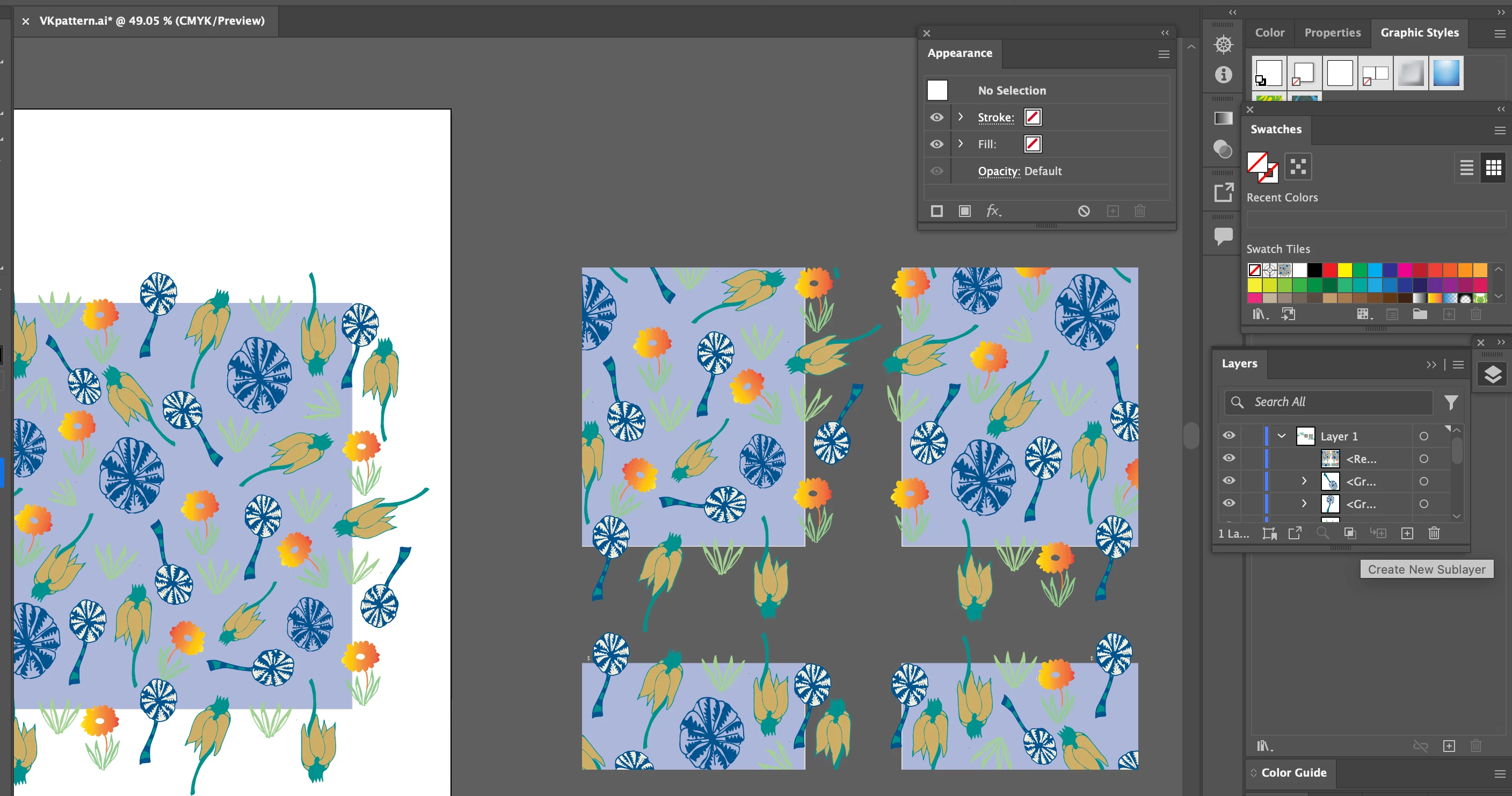
Hi, I’m working on a surface pattern tile and I tried to copy and paste in back with no fill and no stroke a bounding box.  It keeps giving me borders on my repeating pattern.  I’ve also opened the appearance panel to check my layers and do not see anything applied?  I feel I’ve googled as much as I could and I really want to figure this out.  Please help.  Here’s a screen shot of my workspace.


My pattern is on the left and the swatch/repeating pattern is on the right.  Thanks.


    Correct answer Krevkinko

    @Monika Gause Thank you for this tip!!  I ended moving some of the motifs and redoing the margins and it fixed it.  I’ll keep these tips in mind for next time!


    2 replies

    Ton Frederiks
    Community Expert
    Community Expert
    February 17, 2026

    Try working in pixels or points and make sure that the size of your pattern tile does not contain fractions. Fractional pixel values will create faint lines on screen and on export as an image, caused by anti-aliasing

    Try the Object > Pattern > Make option. This will take care of the repeating elements at the sides of your pattern tile. No need for an invisible rectangle in the background.

    Monika Gause
    Community Expert
    Community Expert
    February 17, 2026

    I do not think the pattern editing mode can handle elements overlapping on all 4 sides PLUS the background element.

    Pattern editing mode will only work when the pattern does not contain a background

    Ton Frederiks
    Community Expert
    Community Expert
    February 17, 2026

    I prefer to create patterns without a background, you can always add them later as an additional fill in the Appearance panel. But as long as the background has the same size as the pattern tile and the dimensions do not contain fractions, it works fine. 

    Monika Gause
    Community Expert
    Community Expert
    February 17, 2026

    So what you are doing is creating the pattern tile with the invisible rectangle and dragging the lot into the Swatches panel?

    Can you please show the part of the layers panel that has all of the elements and the invisible rectangle visible?

    Krevkinko
    KrevkinkoAuthor
    Participant
    February 17, 2026

    ok let me try to do that….one sec

    Krevkinko
    KrevkinkoAuthor
    Participant
    February 18, 2026

    Hi! I finally figured it out but now I have a different problem.  Some of the motifs in my pattern are getting cut off in the actual tile:  

    Here’s the original tile I was working on:


    Here’s the pattern where the middle is somewhat messed up….


    Could you help me with that?