
Known Participant
December 16, 2022
Question

BOUNDING BOX IS CLEAR - No remedy found on internet - HELP

  • December 16, 2022
  • 7 replies
  • 3067 views

All,


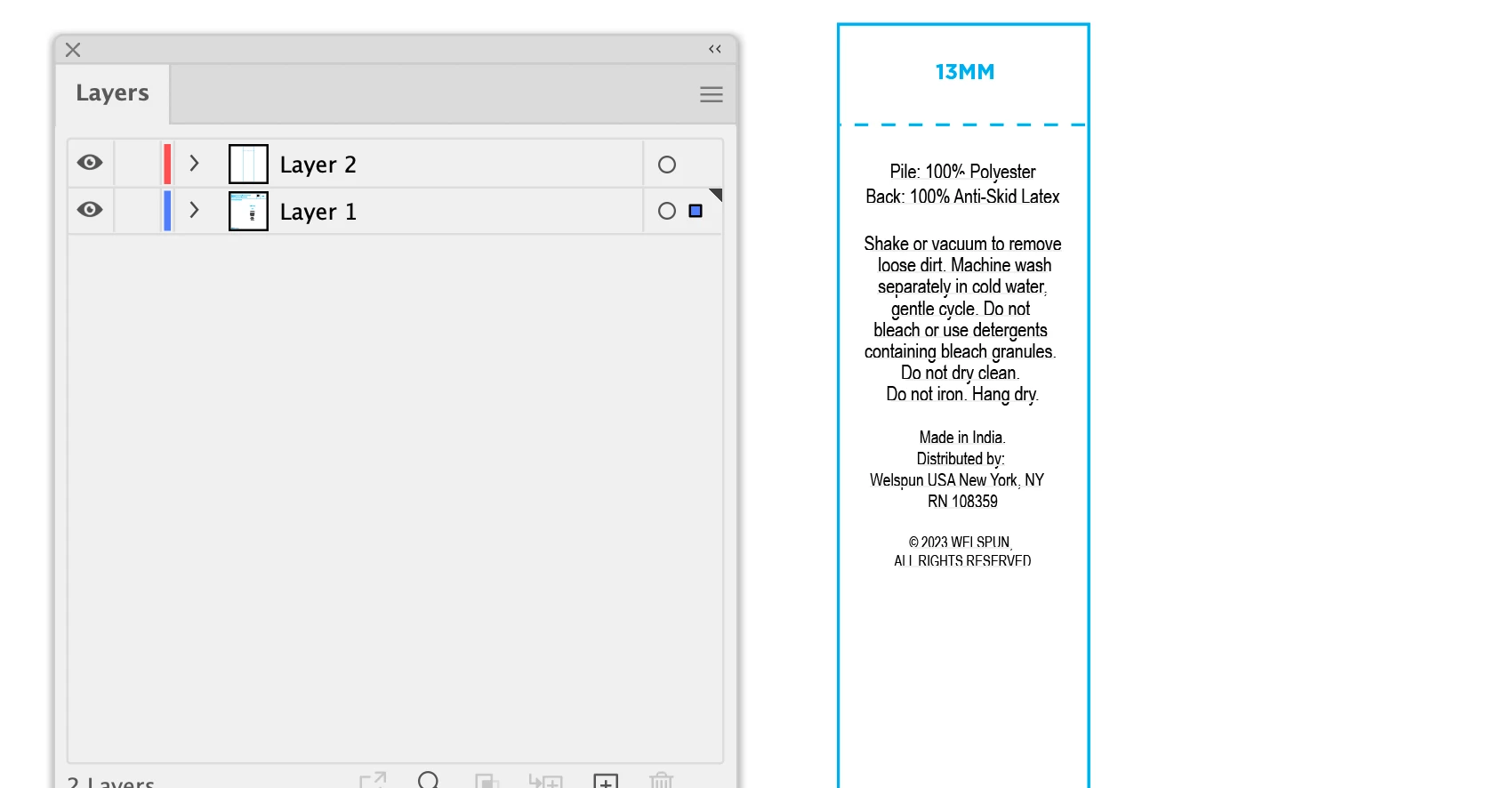
I am unable to color my text bounding box - it is clear and remains clear no matter what I do. I have updated to latest today 12_16_22. The layers reflect a color - this is not functioning.


I am suffering vision issues, time issues and I need this to function as type is my job!


What is going on? How can I fix this. There is nothing in preferences that i can find to fix this.


Thank you
This topic has been closed for replies.

7 replies

tromboniator
Community Expert
Community Expert
January 3, 2023

Are you making the selection using the Selection Tool (black arrow)? Or are you using the Direct Selection or Group Selection Tool (white arrows)? If the latter, the bounding box will not show.


Peter

Known Participant
January 3, 2023

Thank you for all of your efforts, edges are not hidden, nothing is locked, I am aware of the layers panel and how that works. My issue is not resolved, it is affecting the text only (clear). I am going blind.

Ton Frederiks
Community Expert
Community Expert
January 3, 2023

Can you share an exampe file?

CC file sharing, Dropbox, WeTransfer, Google...

Ton Frederiks
Community Expert
Community Expert
December 27, 2022

View > Show Bounding Box?

Monika Gause
Community Expert
Community Expert
December 27, 2022

Please show screenshots that have the text object viible in the Layers panel. You need to click on the little arrow to the left of the layer name in the layer panel.

And please select the text object to take that screeenshot.

Please do also describe what you want to achieve. We still don't understand that.

Known Participant
January 3, 2023

Hello Monika, I appreciate your feedback, yes I understand about the arrow with regarding to bounding box color. It is blue on all layers, my text should be blue, the text is selected. Thank you, I am struggling with this. Please see my attachment.

Doug A Roberts
Community Expert
Community Expert
January 3, 2023

It is possible for sublayers to have a different colour to the main layer. Can you show in the layers panel the exact object that is selected?

michelew83603738
Community Expert
Community Expert
December 27, 2022

Sorry we are not exactly sure what the problem is. Perhaps Hide Bounding Box is on under View? So you need to select Show Bounding Box.

Known Participant
December 27, 2022

Kindly the bounding box is visible, it is clear meaning no color and it is not visible with ease, I am unable to give it a color for visibility. It is not hidden. Thank you for your efforts, something is wrong with the software.

michelew83603738
Community Expert
Community Expert
December 27, 2022

The bounding box is visible but clear. So do you want a background color on for the text? Sorry, but what you want is not at all clear. Can you perhaps draw what it is you want so that we can get an idea of how to help you. From my perpsective, the software is working the way it should. I get a bounding box around my text.

Is this what you get or is this not the problem?

pixxxelschubser
Community Expert
Community Expert
December 27, 2022

I am sorry if I misunderstood you.


Question:
Do you know that the thin frame colours in "typically cyan or magenta" that appear when you drag the mouse over the frame or select the frame are just guides to show the user which layer this object is on?
Objects on layer 1 are usually cyan.

Objects on layer 2 are usually red and so on.


Or can you not select your frame? Then maybe it's because your object is locked. Click on the little arrow next to the eye of the layer in the Layers panel to 'unfold' the layer. Then you can see the objects it contains and also whether they are locked or invisible.

Known Participant
December 27, 2022

Kindly, the color bars on the layer should reflect the bounding box color when you click on that layer. This is difficult to explain in messages.

Thank you for your consideration.


Judy


[ private informations removed by moderator for security reasons ]

pixxxelschubser
Community Expert
Community Expert
December 27, 2022

I'm sorry, but I still don't understand your problem.


  1. What do you want to do?
  2. What is not working?
  3. Can you describe the problem better with some additional screenshots and a more detailed explanation?
Ton Frederiks
Community Expert
Community Expert
December 16, 2022

If you want to color a text frame, click outside it to deselect it.

Use the Direct Selection tool (A) to click exactly on the border of the frame.

Now you can fill and stroke it.

Known Participant
December 27, 2022

Hello,

Thank you for your effort, kindly this is not an text frame.

I am having a software issue, the bouding box - there is a color sliver on layers typically cyan or magenta, that colors the bounding box. I cannot color this box. This has nothing to do with the text box.

thank you anyway