Répondu
Breaking a gradient to a grid
Hey,
Does anyone know how to break a gradient into a grid like the image below? Struggling for ideas.
Has to be vector.
Thanks!


Hey,
Does anyone know how to break a gradient into a grid like the image below? Struggling for ideas.
Has to be vector.
Thanks!
Joegeee, Hi.
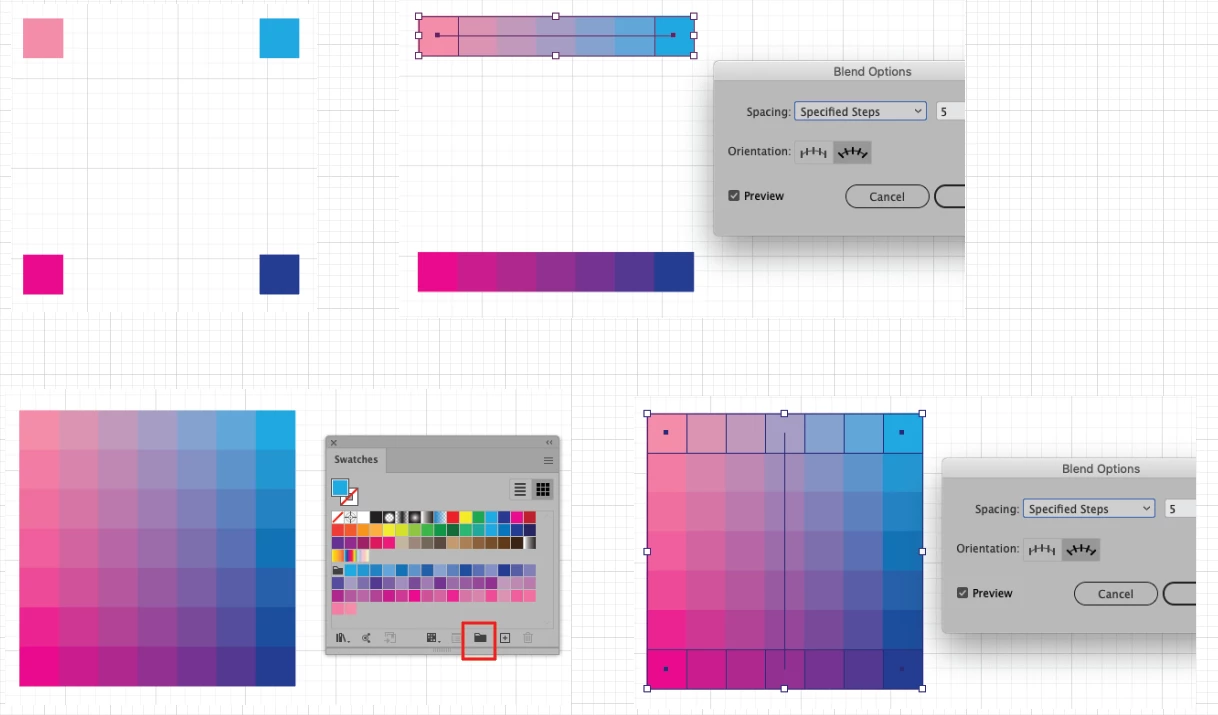
Another method is to use Blend Steps. See image below.
Here I started with 4 squares, pinks and blues.
Object>Blend. I used Blend Steps 5
Do the top two, then the bottom two.
Object>Blend>Expand.
Now take those two Groups and Blend again.
Expand.
Select all, Swatches panel, Create a New Color Group.
K
Enter your E-mail address. We'll send you an e-mail with instructions to reset your password.


 AdChoices