Participating Frequently
November 26, 2020
Answered

Brush stroke offset error

  • November 26, 2020
  • 5 replies
  • 3214 views

I have a rather large artboard (420x6000mm). Whenever I try to use a brush to stroke an object, the stroke brush is offset in regard to the path. See screengrab. 
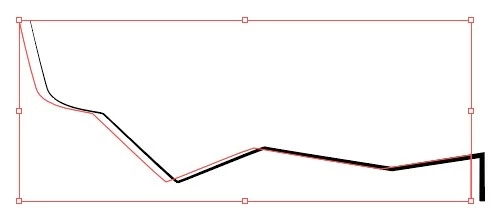
 

What is wrong?

Correct answer Doug A Roberts

Hello,


I created a bug report for this at uservoice. Please vote if you are affected (or even if you're not).


https://illustrator.uservoice.com/forums/601447-illustrator-desktop-bugs/suggestions/42062074-art-brushes-offset-in-large-canvas-documents

5 replies

Doug A Roberts
Community Expert
Doug A RobertsCommunity ExpertCorrect answer
Community Expert
November 27, 2020

Hello,


I created a bug report for this at uservoice. Please vote if you are affected (or even if you're not).


https://illustrator.uservoice.com/forums/601447-illustrator-desktop-bugs/suggestions/42062074-art-brushes-offset-in-large-canvas-documents

Participant
June 1, 2023

I just added an offset path FX to it and changed it to round, seemed to cure it.

Anna Lander
Inspiring
November 26, 2020

Do you need here to use exactly Brush stroke? If you don't plan to use any comples shapes for the strokes, maybe you could get the same "arrow-shaped" line using a Stroke Profile? 

the artboard is 420x6000

Participating Frequently
November 26, 2020

Good idea!

Jacob Bugge
Community Expert
Community Expert
November 26, 2020

Baard,


It seems to be some kind of corruption, which can be either in the document itself, or a general one, maybe affecting only large Artboards.


The way things look corresponds to an effect (Effect>Distort & Transform>Transform with a horizontal Move setting) but such an effect would have shown in the Appearance palette which Doug asked for.


You can try to create a new document with the same size and copy the artwork over and see; failing that you can try with new artwork in the new document.


Participating Frequently
November 26, 2020

Thanks Jacob! I've tried all of those things. Seems this is always the case with an artboard of my size. I guess I'll have to make it in a smaller artboard, outline strokes, import it and scale it afterwords. 

Participating Frequently
November 26, 2020

I think it has something to do with my document. This is an object with the same stroke created in a standard A4 document:

Here is the same object copy+pasted into my large document:


But I can't find anything wrong with the settings.


Doug A Roberts
Community Expert
Community Expert
November 26, 2020

Can you show the appearance panel for that object?

Also the brush options?

Participating Frequently
November 26, 2020

Any ideas?

Anna Lander
Inspiring
November 26, 2020

add please an Appearance panel with the object selected. Now it's with "No selection", so some details can be missed.