Participant
July 2, 2022
Answered

Bug [illustrator is losing detail]

  • July 2, 2022
  • 3 replies
  • 351 views
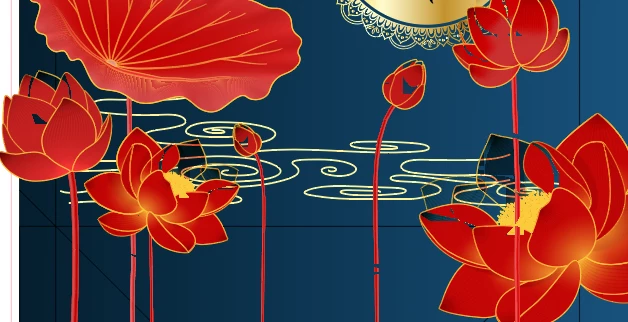
My illustrator is losing detail piece by piece like this one. I don't know why, does anyone know how to fix it. Please help me, thanks



This topic has been closed for replies.
Correct answer Ton Frederiks

That looks indeed strange. Did you check if it is not a preview problem?

Try Cmd E (on Mac) or Ctrl E (on Win) to switch between GPU and CPU Preview.

3 replies

michelew83603738
Community Expert
Community Expert
July 2, 2022

This does look strange, but are you placing the designs over something. It would help if we had more information or a look at the layer panel. Are you saying that over time the piece is losing detail? Not sure what is going on exactly without more info.

Bill Silbert
Community Expert
Community Expert
July 2, 2022

Is the lower image the same as the top image but with a more outlined look? Or are both images actually a new version of themselves but with less detail? If the latter is the case then you will need to show what they originally looked like so that we can see the change. There is no real way to diagnose your issue without something to compare against.

Ton Frederiks
Community Expert
Ton FrederiksCommunity ExpertCorrect answer
Community Expert
July 2, 2022

That looks indeed strange. Did you check if it is not a preview problem?

Try Cmd E (on Mac) or Ctrl E (on Win) to switch between GPU and CPU Preview.